How to Unblock Someone on Messenger: App, Computer and Facebook Steps for 2026 and 2027
How to unblock someone on Messenger on your phone or computer, how to unblock a full Facebook profile, and what changes after you unblock, from Meta.
In this article
Quick answer: To unblock someone on Messenger in the app, tap Settings, then People, then Blocked, tap their name and switch Blocked Messages off. Blocked their whole Facebook profile? Use Facebook's Blocking settings instead; a profile block covers both apps. Unblocking doesn't make you friends again, and you can't block that same profile again for a few days.
You blocked a friend in a moment of annoyance, and now you need to know how to unblock someone on Messenger. Which button did you press? You can't remember, and that matters.
Messenger has two kinds of block, and each one comes off in a different place. This guide covers both, on the app or a computer, with Meta's own steps and what changes afterwards.
Two kinds of block on Messenger
Messenger lets you block someone in two different ways, and you need to know which one you used before you can undo it, because you lift each block in a different place. Meta's help page on blocking someone on Messenger explains the difference. Here it is side by side.
| Block messages and calls | Block on Facebook | |
|---|---|---|
| What it stops | Messages and calls on Messenger and Facebook chat | Messages, calls and finding your profile on Messenger or Facebook |
| Their Facebook profile | You can still see it | Blocked on Facebook too |
| Friendship | Stays as it was | Blocking unfriends them |
| Where to unblock | Messenger block settings | Facebook settings, under Blocking |
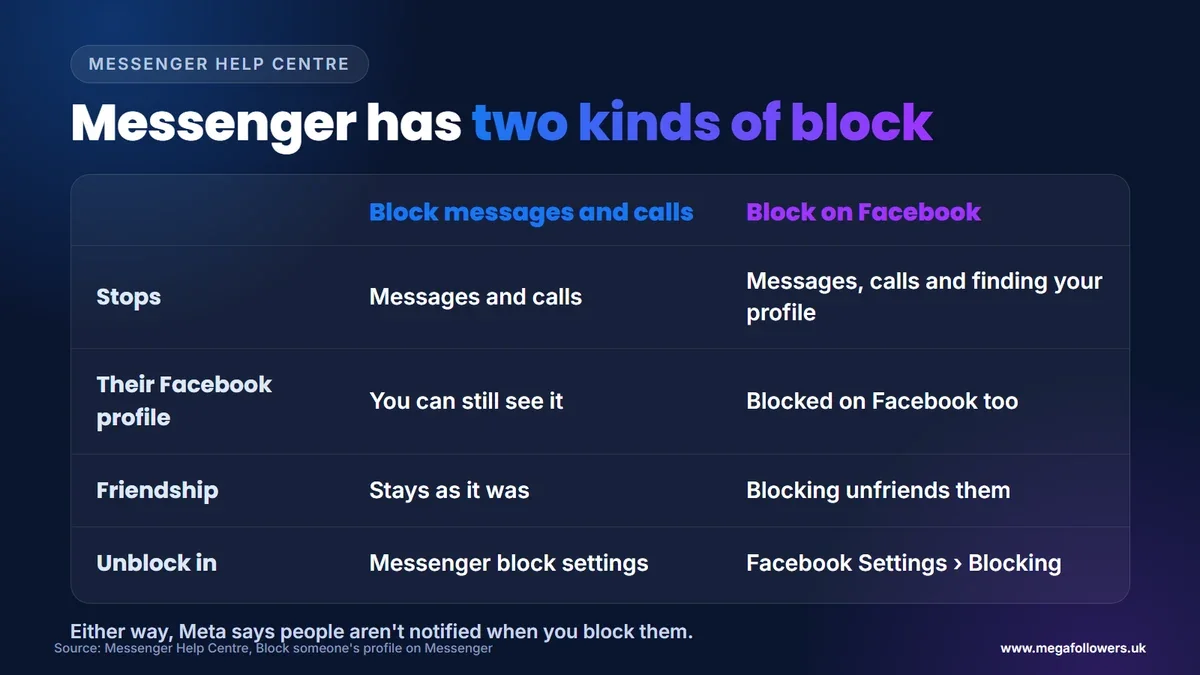
Blocking someone's profile from Messenger blocks them on Facebook as well, and if you were friends, it unfriends them. No alert goes out. Meta says people aren't notified when you block them.
What most guides get wrong: they give one set of unblock steps. If you blocked a whole profile, unblocking messages in Messenger won't undo it; you have to unblock the profile in Facebook's settings.
How to unblock someone on Messenger (app)
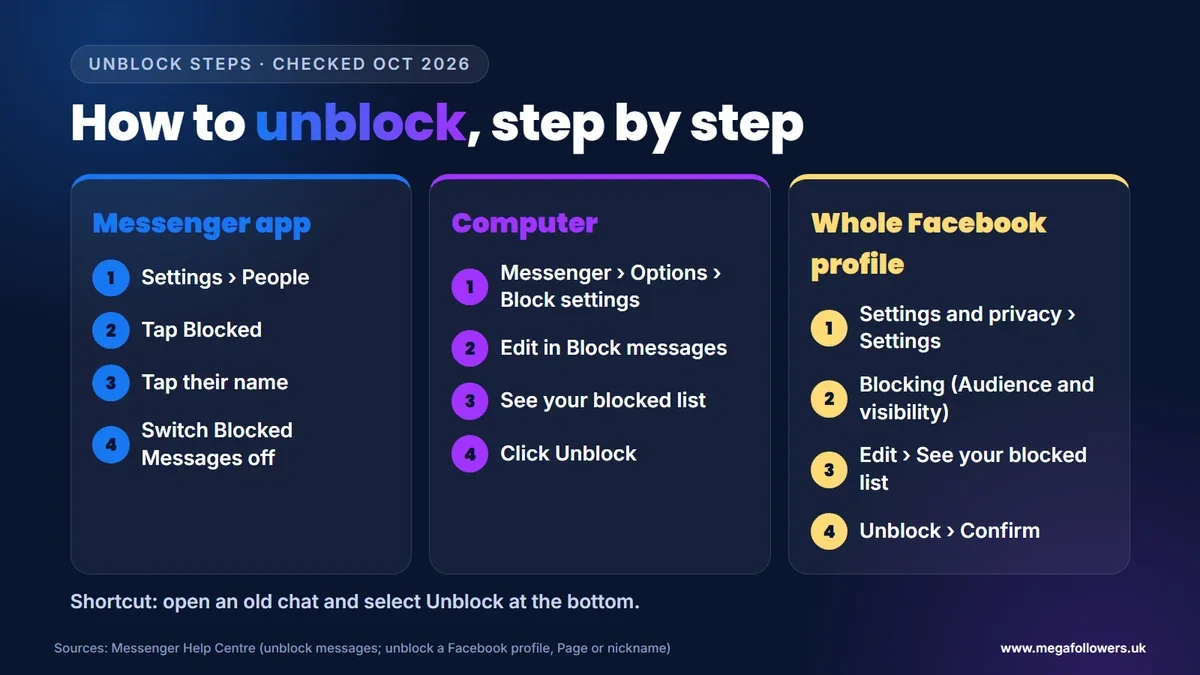
This is the most common case. To unblock someone's messages on your phone, Meta's Messenger help page on unblocking messages gives these steps:
- In Messenger, tap Settings, then People.
- Tap Blocked.
- Tap the name of the person you want to unblock.
- Tap next to Blocked Messages to unblock them.
Once you've done it, they can message and call you on Messenger again. The steps above only lift a message block, so if their name still won't appear when you search, you probably blocked their profile instead.
How to unblock someone on Messenger on a computer
On a computer, you can unblock messages from Facebook itself. Meta's guide to unblocking messages from a profile gives these steps:
- In the top right of Facebook, click Messenger.
- Next to Chats, click Options at the top, then Block settings.
- Click Edit in the Block messages section.
- Click See your blocked list, then Unblock next to the person's name.
There's a shortcut, too. Open an old conversation with the person and select Unblock, followed by their name, at the bottom of the chat.
How to unblock someone's profile on Facebook
If you blocked someone's whole profile, unblock them in Facebook's settings. Meta's page on unblocking a Facebook profile, Page or nickname gives these steps on a computer:
- Click your profile picture in the top right of Facebook.
- Select Settings and privacy, then Settings.
- In the left column, under Audience and visibility, click Blocking.
- Next to Block profiles and Pages, click Edit, then See your blocked list.
- Click Unblock next to the profile, then Confirm.
Group nicknames work the same way. If you blocked a nickname in a Facebook group, unblock it from the same Blocking settings, and once you've confirmed, you'll see that person's content in the group again and they'll be able to tag you and interact with your posts there.
What happens when you unblock someone
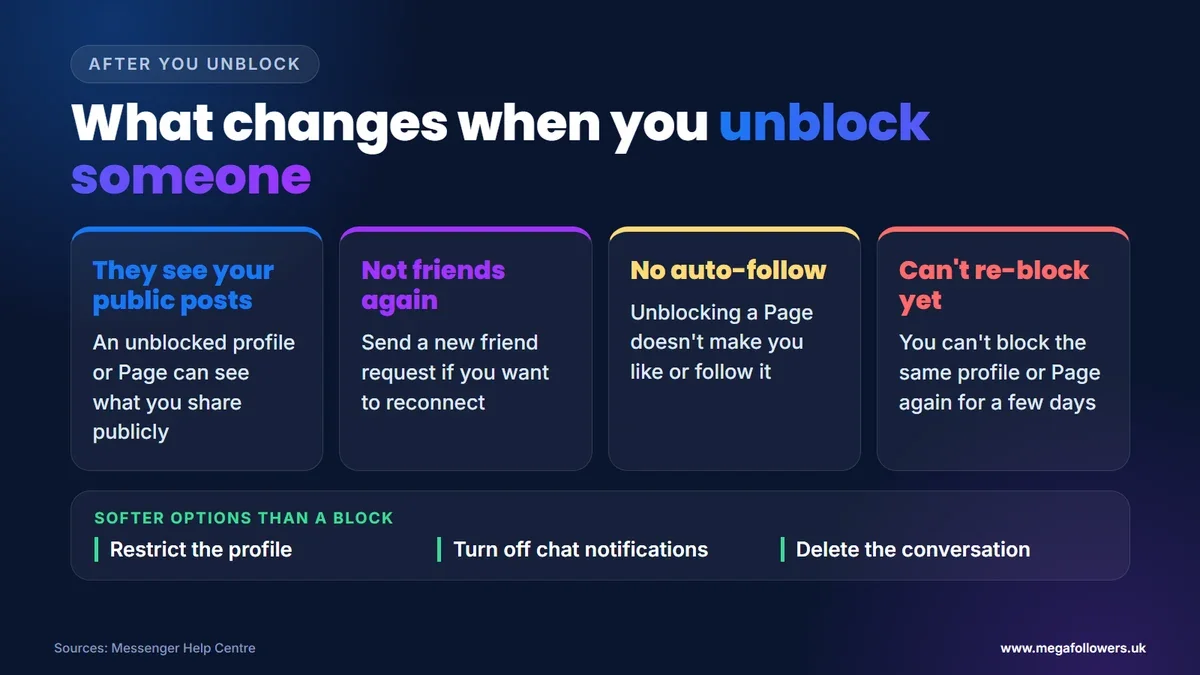
Unblocking reverses the block, but it doesn't restore everything. Meta lists what changes:
- They can see your public posts again. An unblocked profile or Page can see anything you share publicly on Facebook.
- You won't be friends again automatically. If you want to be friends, you'll need to send a new friend request.
- You won't follow a Page automatically. Unblocking a Page doesn't make you like or follow it.
- You can't re-block straight away. After unblocking a profile or Page, you won't be able to block it again for a few days. This doesn't apply to group nicknames.
Think about that waiting period. If you're unsure whether you want contact again, a softer option may suit you better.
Alternatives to blocking someone on Messenger
You don't have to choose between a full block and an open inbox. Meta's blocking page suggests three gentler options:
- Restrict the profile. Restricting someone quietly limits their contact without a full block.
- Turn off chat notifications. You keep the conversation, but stop the alerts.
- Delete the conversation. It clears the chat from your inbox.
Messenger also lets you control who can message you at all, which helps if unwanted messages come from strangers rather than one person. It's worth a look before you block anyone.
One more detail for people with more than one Facebook profile. When you block someone from the Messenger app, it only blocks them from the profile you're using, so you'd need to block them from your other profiles separately.
Blocking, teens and what could change in 2027
Messenger includes tools for families: Meta's help centre covers how parents can view the contacts their teen is blocking on Messenger through supervision. That matters more as UK rules tighten.
The government said on 15 July 2026 that it expects its ban on social media services for under-16s to start in spring 2027. Our view: expect more teen-safety controls around messaging, including blocking and contact settings, as platforms prepare for it.
Back in touch, and building your audience
Getting back in touch is about one conversation. If you also run a Page or a public profile, the people you reach there judge you by what they see first: likes, follows and activity.
Mega Followers UK helps with that first impression. Facebook post likes, Facebook followers and Facebook Page likes and follows come from real-looking accounts, with no password required and a 30-day refill guarantee. For organic growth, read how to get more Facebook likes and how to increase Facebook Page likes, or see our FAQs.
FAQ: unblocking someone on Messenger
Does someone know if you unblock them on Messenger?
Meta's help pages don't describe any notification when you unblock someone, and they say people aren't notified when you block them. The person will simply be able to message and call you again, and if you unblocked their profile, they'll be able to see your public posts on Facebook.
Why can't I find someone to unblock on Messenger?
Most likely you blocked their whole Facebook profile rather than just their messages. Profile blocks live in Facebook's settings: go to Settings and privacy, then Settings, then Blocking, and look in your blocked profiles and Pages list. Unblocking only their messages in Messenger won't lift a profile block.
Will unblocking someone on Messenger make us friends again?
No. A block that removed a friendship stays removed after you unblock. Meta says an unblocked profile won't automatically become your friend, so you'd need to send a new friend request. Unblocking a Page also doesn't make you like or follow it again.
Can I block someone again after unblocking them?
Not straight away. Meta says that after you unblock a profile or Page, you won't be able to block it again for a few days, though the wait doesn't apply to nicknames in Facebook groups. Need space in the meantime? Turn off chat notifications or restrict the profile.
Will old messages come back after I unblock someone?
Meta's help pages don't say whether unblocking deletes or restores anything. You can unblock someone from an old conversation, which suggests the chat stays in your inbox while they're blocked. If you deleted the conversation yourself, though, lifting the block won't bring those messages back.
How do I unblock someone on Messenger without Facebook?
In the Messenger app, tap Settings, then People, then Blocked, choose the person and switch off Blocked Messages. That unblocks their messages and calls. If you blocked their profile, you'll need Facebook's Blocking settings, because a profile block covers both Messenger and Facebook.