How to Get More Followers on Facebook: Profile and Page Tactics for 2026 and 2027
How to get more followers on Facebook in 2026: turn on pro mode, use the follow settings most people miss and Meta's own Page tips, plus a 4-week plan.
In this article
Quick answer: Here's how to get more followers on Facebook: first, make following possible. Turn on pro mode for your profile so anyone can follow you, or grow a Page, which people can only follow since Meta removed Page likes in 2025. Then post when your audience is online, share content worth passing on, and invite your followers' friends.
You post something good, a few friends react, and your follower count doesn't move. Often the content isn't the problem. Your profile simply doesn't let strangers follow you.
Facebook has changed how following works twice in the last two years, and most guides haven't caught up. This one starts with the settings Meta's own help pages describe, then covers the tactics that grow a following on a profile or a Page.
How do followers work on Facebook?
Followers work differently on profiles and Pages. According to Facebook's help page on who can follow you, friends automatically follow each other, and people who aren't your friends can only follow your profile if you turn on pro mode.
There's a detail most people miss. When someone sends you a friend request and you ignore or delete it, they automatically start following you. So some of your followers are people you chose not to add.
Pages work on follows only. Meta's guide to growing your Page audience says that from August 2025 people can no longer like Pages and can only follow them, although they can still like posts.
| Account type | Who can follow | Limits |
|---|---|---|
| Default profile | Your friends, plus anyone whose friend request you ignored or deleted | 5,000 friends |
| Profile in pro mode | Anyone on Facebook, by default | Unlimited followers, 5,000 friends |
| Page | Anyone; Page likes ended in August 2025 | No follower limit stated by Meta |
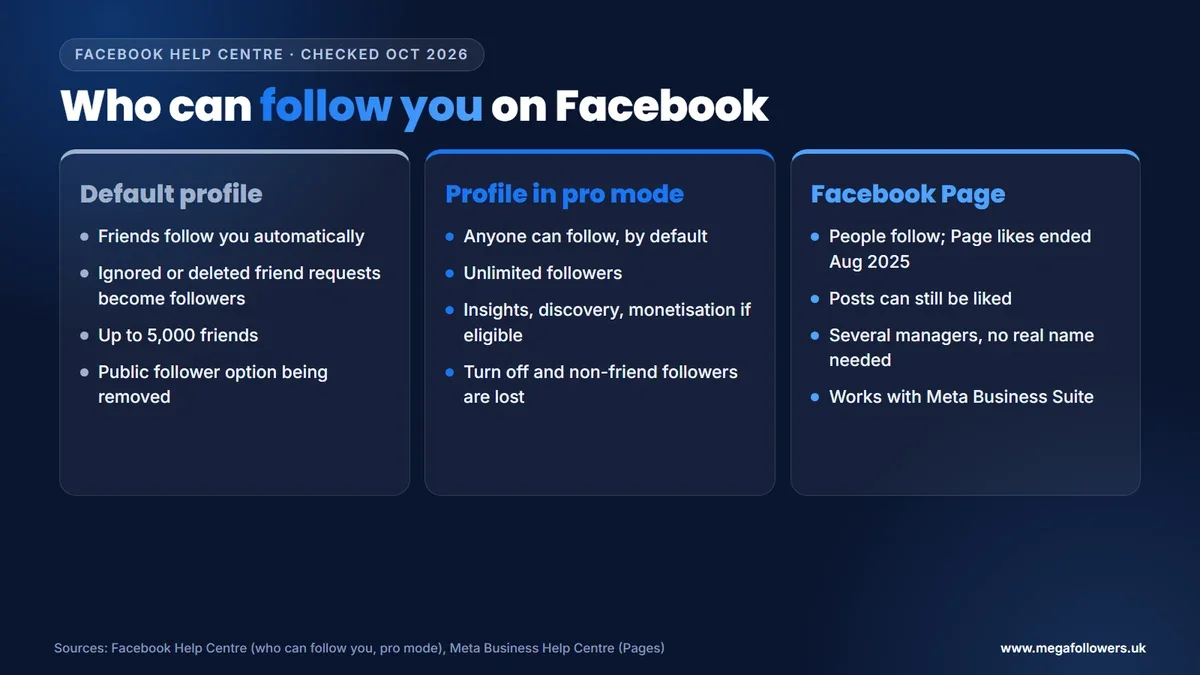
What most guides get wrong: they tell you to "change your follow setting to Public" on a normal profile. Meta is removing that option from default profiles, so public followers now come through pro mode.
Turn on pro mode to let anyone follow your profile
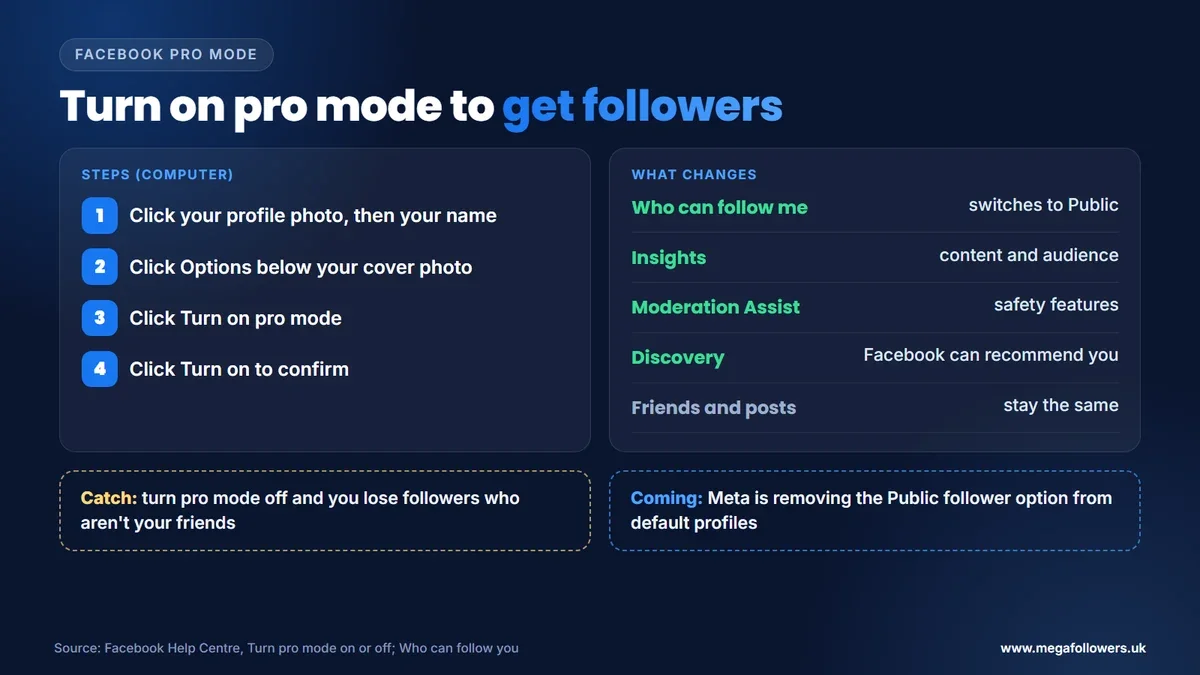
Pro mode is the quickest way to open your profile to followers. Facebook's guide to turning pro mode on or off gives these steps on a computer:
- Click your profile photo in the top right, then click your name.
- Click Options below your cover photo.
- Click Turn on pro mode.
- Click Turn on to confirm.
When pro mode is on, your "Who can follow me" setting switches to Public, so people who aren't your friends can follow you and see your public posts. You also get content and audience insights, safety features such as Moderation Assist, eligibility for discovery on Facebook and, if you qualify, monetisation tools. Your friends and existing posts stay the same.
Meta is also moving profiles towards pro mode. It plans to remove the Public follower option from default profiles gradually, its help page says. If you have public followers and don't choose an option, Facebook turns on pro mode automatically to keep them.
Once pro mode is on, three public settings deserve a look. The first, Public post comments, controls who can comment on your public posts. Notifications come next: a separate setting decides whether you hear about new followers who aren't friends, and about their likes, comments and shares on what you post publicly. Last, Public profile info sets who can react to changes in your Intro, so check all three before you start promoting the profile.
If you sell on Marketplace, there's one more route in: anyone on Marketplace can follow you if you allow following there. Every follower matters, because when someone follows you, your public posts can appear in their Feed.
Two catches are worth knowing. To use some additional pro mode features you must first enable ads, which means agreeing to Meta's Commercial Terms. And if you later turn pro mode off, your follow setting changes back to Friends and you lose every follower who isn't a friend.
Or grow a Facebook Page instead
A Page suits you if you want a separate public presence, a team helping you, or a brand that isn't tied to your real name. Since August 2025, everyone who connects with a Page does so as a follower. Meta's own checklist for growing a Page audience covers the basics:
- Choose categories that describe what you do.
- Add a profile picture, cover photo and full profile information.
- Add an action button.
- Turn on recommendations.
- Use Page Insights to understand your audience.
- Add your address and keep your hours updated, if you have a physical location.
- Post when your audience is online.
Paid options sit on the same list. Targeted ad campaigns and engagement ads can bring followers faster when you have a budget, and Page Insights then helps you sharpen who those ads reach.
One practical difference decides it for many businesses. Meta Business Suite works with Pages but not with pro mode, so if you already manage ads, inboxes and posts in Business Suite, a Page keeps everything in one place.
How to get more followers on Facebook: 9 tactics that work
Settings make following possible. These tactics give people a reason to do it.
- Finish your profile or Page. A clear photo, cover image, bio and category tell visitors what they'll get if they follow. Meta lists these first in its Page checklist.
- Post when your audience is online. Meta recommends it directly. The Professional dashboard in pro mode shows insights about your followers, post reach and engagement, and Page Insights does the same for a Page, so schedule around what they show.
- Make posts worth sharing. Meta's best practices for Page posts start with high-quality creatives, a clear message and posts that ask people to do something. Shares put you in front of new people.
- Use a mix of formats. Photos, Reels, Stories, LIVE videos and events reach people in different places on Facebook. Test each one and keep what your insights say works.
- Pin your best post. Meta suggests pinning significant posts, so a new visitor sees your strongest work first.
- Ask followers to invite friends. In pro mode, your followers can invite their friends to follow your profile, which spreads you through networks that already trust them.
- Reply to comments. A reply turns a one-off comment into a conversation, and visitors notice an account that talks back.
- Let Facebook recommend you. Turn on recommendations for a Page, or use pro mode, which makes your content eligible for discovery and lets Facebook suggest that people follow you.
- Boost your best posts. Meta lists boosting your best posts as a way to reach more people, and a post that already performs well gives the boost a head start.
New visitors also judge a profile quickly. One with a healthy follower count and active posts looks like it's worth following, which is why some accounts add Facebook followers as social proof while their posting builds the organic side.
How to see who follows you on Facebook
You can check your follower list from your profile. Facebook's help page gives these steps:
- Go to your profile and click More below your cover photo.
- Click Friends.
- Click Followers.
If you don't have any followers, you won't see the option, and the list doesn't show which of your friends follow you. To stop someone following you, block them.
A 4-week plan to grow your Facebook followers
A month of steady work beats a burst of posting. This plan uses the steps above in order.
| Week | Focus | Actions |
|---|---|---|
| 1 | Set-up | Turn on pro mode or set up your Page, finish your bio, photos and category, pin your best post |
| 2 | Rhythm | Check when your audience is online, then post three to five times at those times |
| 3 | Reach | Post one shareable piece, ask followers to invite friends, reply to every comment |
| 4 | Review | Compare posts in your insights, keep the best formats, boost the top post if you have budget |
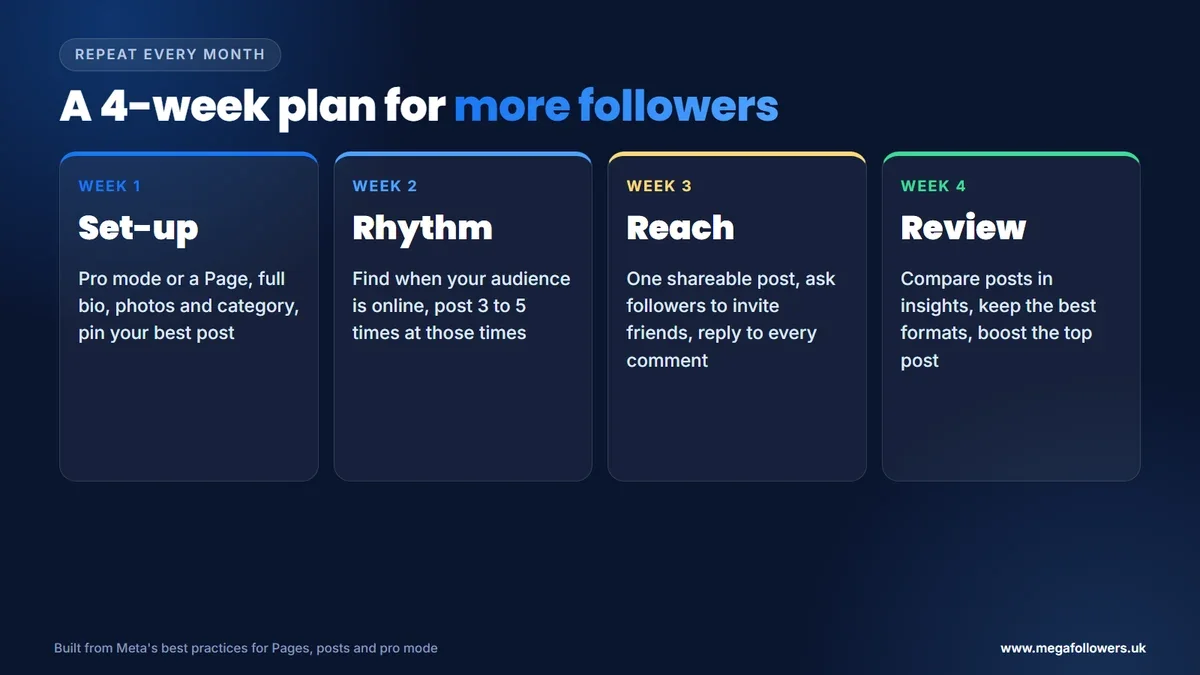
Repeat the cycle every month. Each review shows you which posts brought followers, so the next month starts from evidence instead of guesswork.
What changes for Facebook followers in 2027
Meta says it's removing the Public follower option from default profiles gradually, with no end date given. Expect more profiles to switch to pro mode through 2027, and plan your follower growth around pro mode or a Page.
The UK government also said on 15 July 2026 that it expects its ban on social media services for under-16s to start in spring 2027. Accounts with a young audience should expect it to shrink.
Our view: the direction is clear. Facebook is splitting personal and public use, so decide now whether your growth belongs on a pro mode profile or a Page.
A follow button is the start. Proof gets people to press it
Settings open the door, and good posts bring people to it. What tips a visitor into following is seeing that others already have.
Mega Followers UK helps with that first impression. Facebook Page likes and follows and Facebook post likes come from real-looking accounts, with no password required and a 30-day refill guarantee. For more on Facebook growth, read how to increase Facebook Page likes, how to get more Facebook likes and how to earn from Facebook, or see our FAQs.
FAQ: getting more followers on Facebook
Why can't people follow me on Facebook?
Your profile is probably a default profile. On a default profile, only your friends follow you automatically, and Meta is removing the option to allow public followers. Turn on pro mode from Options below your cover photo, and your "Who can follow me" setting switches to Public, so anyone can follow you.
Do ignored friend requests become followers?
Yes. Facebook's help page says that when you ignore or delete a friend request, that person automatically starts following you. They'll see posts you share publicly in their Feed. If you'd rather they didn't follow you at all, you can block them from your profile.
How many followers do you need to make money on Facebook?
There's no single number. Each monetisation feature sets its own eligibility rules, and Facebook users under 18 aren't eligible. Pro mode or a Page gives you access to the tools once you qualify, and our guide on earning from Facebook covers the main routes and their requirements.
Can you see who follows you on Facebook?
Yes. Go to your profile, click More below your cover photo, then Friends, then Followers. The option only appears once you have followers, and it doesn't show which of your friends follow you. Anyone you'd prefer not to have as a follower can be blocked.
Is a Page or pro mode better for getting followers?
It depends on how you want to appear. Pro mode keeps your public presence on your personal profile, with unlimited followers and your real name. A Page is separate, can have several managers and doesn't need your real name, which suits a business or brand better.
Do Facebook Page likes still exist?
No. Meta says that from August 2025, people can no longer like Pages and can only follow them. They can still like individual posts on a Page. That makes followers the main number for a Page, alongside likes and other reactions on what you post.