Digital Creator Meaning on Facebook and Instagram: What It Is and How to Become One in 2026 and 2027
Digital creator meaning, explained: why Facebook labels profiles Digital creator by default, what it means on Instagram, and how to become one in the UK.
In this article
Quick answer: A digital creator is someone who makes content such as videos, photos, posts or podcasts for an online audience. On Facebook, "Digital creator" under someone's name usually means they've turned on professional mode, which sets that category by default. On Instagram, it's a category that creator and business accounts can choose to show.
Your aunt, your old school friend and the man who runs the chip shop all have "Digital creator" under their names now. None of them seems to be creating much.
That's because the label often isn't a choice. This guide explains the digital creator meaning on each platform, using Meta's own help pages, and shows how to change the label, hide it, or turn it into something real.
What does digital creator mean?
A digital creator is anyone who regularly makes content for people online. That covers YouTubers, TikTokers, Instagram photographers, podcasters, bloggers and people who post recipes, tutorials or comedy on Facebook. What links them is making things for an audience rather than only for friends.
It's a loose title on purpose. Some creators earn a full-time living from brand deals, ad revenue and subscriptions, while others post as a hobby or to promote a business and never earn a penny from the content itself. Here are three examples:
- A baker who posts cake-decorating Reels and sells to people who find her through them.
- A football fan who posts match reactions on Facebook and earns from Facebook content monetisation.
- A student who reviews skincare on TikTok and is building an audience before any brand pays.
- A podcaster who cuts each episode into short clips for Instagram and Facebook.
All three are digital creators. The label describes what they do, not how big they are or how much they earn.
What does digital creator mean on Facebook?
On Facebook, "Digital creator" is a profile category, and it usually appears because someone has turned on professional mode. Meta's guide to pro mode for profiles says plainly: "When you turn on pro mode, your profile is set to the category Digital creator by default."
So the label doesn't mean the person chose it. They switched on pro mode, or Facebook switched it on for them, and the category never changed.
That second route explains why the label is suddenly everywhere. Facebook's help page on who can follow you says Meta is removing the Public follower option from default profiles, and that if someone with public followers doesn't choose an option, Facebook turns on pro mode automatically to keep their followers.
What most guides get wrong: they treat "Digital creator" on Facebook as a career statement. Most of the time it's Facebook's default category for any profile in professional mode.
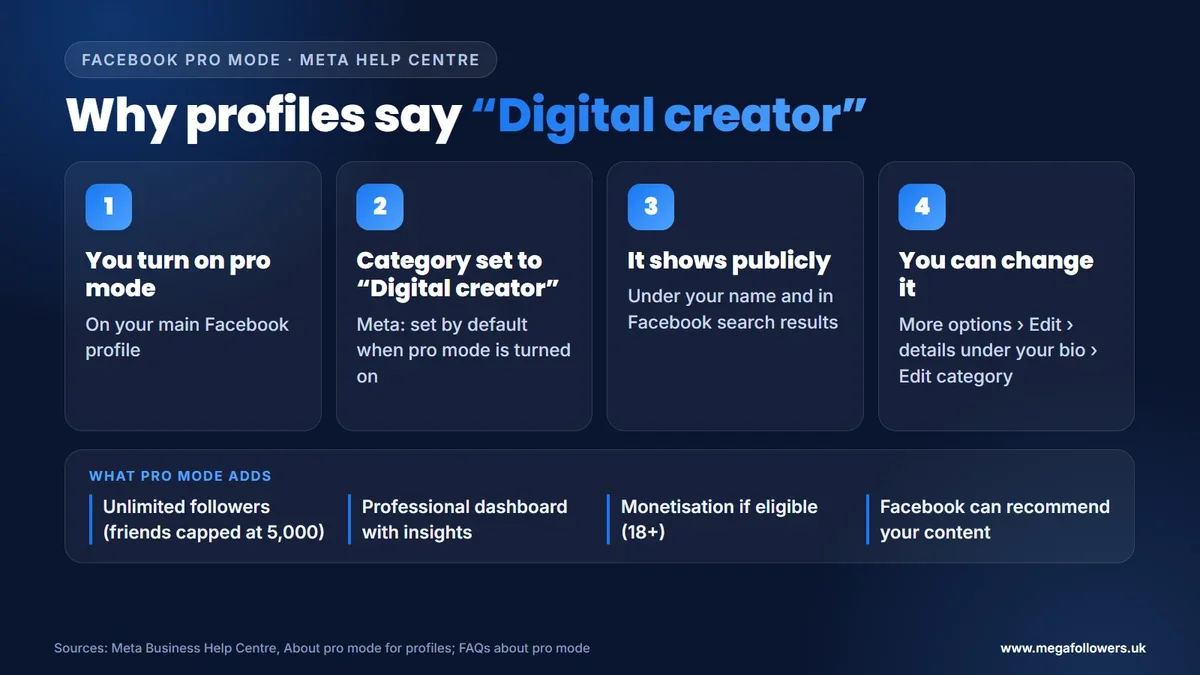
Professional mode changes several things. According to Meta's frequently asked questions about pro mode:
- Followers: anyone on Facebook can follow the profile and see its public posts, with no limit on followers. Friends stay capped at 5,000.
- Tools: the profile gets a Professional dashboard with insights about followers, reach and engagement.
- Money: eligible creators can access monetisation features. People under 18 aren't eligible.
- Discovery: Facebook can recommend the profile's content, or suggest that people follow it.
Pro mode doesn't create a second profile. It adds the tools to your existing one, and you can still post things for friends only. Meta notes that these tools used to be available only on Pages.
Pro mode also brings creator support: help articles, issue reports and, for Meta Verified subscribers, a live chat agent. That support is only available in English, and your followers can invite their friends to follow you too.
Two smaller details surprise people. Meta Business Suite doesn't work with pro mode, so you use the Professional dashboard instead. And Facebook shows extra information in a Profile transparency section on pro mode profiles, which Meta describes as a way to increase accountability.
One myth is worth clearing up. Turning on pro mode doesn't let anyone see who viewed their profile. Facebook's Help Centre says it doesn't let people track who views their profile, and that third-party apps can't do it either.
How to change or remove "Digital creator" on Facebook
You can swap the default for a category that fits you better. It takes a minute. Meta's pro mode guide gives these steps:
- From your profile, tap More options.
- Select Edit, then scroll to the details under your bio and tap Edit.
- Select Edit to choose your category.
Facebook doesn't let you invent your own category. Pick the closest match to what you actually post, because the choice is public: your main category appears under your name and shows up in Facebook search results whenever someone looks you up.
Prefer to leave pro mode altogether? You can turn it off. Meta lists what you lose: your content and audience insights, safety features such as Moderation Assist, eligibility for discovery, and future monetisation payouts. Content protection for your original posts stops too.
Pro mode or a Facebook Page: which suits a creator?
Pro mode keeps everything on your personal profile, while a Page is a separate public presence. Meta's guide to Facebook profile types sets out the differences.
| Pro mode on your profile | Facebook Page | |
|---|---|---|
| Where it lives | Your main personal profile | A separate profile for public use |
| Real name | Required | Not required |
| Who manages it | Only you | More than one person can |
| How many | One, on your main profile | You can have several |
| Followers | Unlimited followers, 5,000 friends | Public by default, anyone can follow |
| Tools | Professional dashboard, monetisation if eligible | Professional tools, Meta Business Suite |
Choose pro mode if your audience already knows you personally and you want one place to post. A Page makes more sense if you want a separate brand, a team helping you, or a presence that isn't tied to your real name.
What does digital creator mean on Instagram?
On Instagram, "Digital creator" is one of the categories you can pick when you switch to a professional account. It sits under your name on your profile, if you choose to show it.
Instagram's guide to setting up a professional account walks through it. You go to Settings and activity, tap Account type and tools under For professionals, choose Switch to professional account, then select a category. Instagram notes that the category doesn't decide whether you get a creator or business account; you choose that separately.
The label is optional. To hide it, go to your profile, tap Edit profile, open Profile display under Public business information and choose whether to show your category label and contact details.
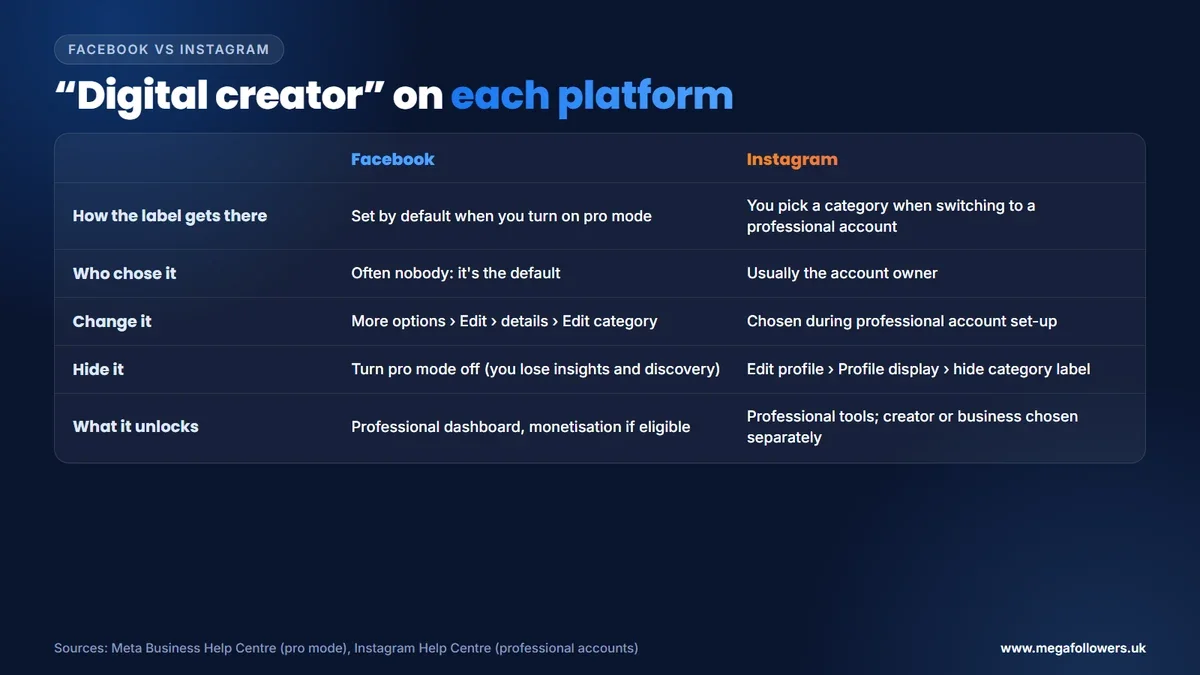
So on Instagram, the label is usually a deliberate choice, picked by someone who went through the professional account set-up and decided it described them better than any other category on the list. On Facebook, it's often a default nobody touched.
Should you keep the Digital creator label?
It depends on how you use Facebook. Here's a simple rule of thumb, based on what Meta says each option does.
- You only post for friends and family: turn pro mode off. You lose insights and discovery, but you don't use them anyway, and the label disappears.
- You post publicly about one subject: keep pro mode and change the category to match it, so visitors see what you do at a glance.
- You run a business or want a team to help: create a Page. It can have several managers and doesn't need your real name.
- You're under 18: monetisation isn't open to you yet, so pro mode mainly adds public followers. Think about whether you want strangers following before you keep it.
Whatever you choose, check it once. A default category you never picked tells strangers very little, and it's the first thing they read under your name.
Is a digital creator the same as an influencer?
Not quite. Making content defines a digital creator, while sway over an audience's choices, usually what they buy, defines an influencer. Many people are both, but you can be a creator with a small audience, or an influencer who mainly reposts other people's work.
Brands tend to say "influencer" when they're paying for promotion. "Creator" has become the broader, friendlier word, and it's the one both Meta platforms use in their tools.
The rules don't change with the title. If a brand pays you or gives you something in return for a post, UK advertising rules apply either way. Not sure whether a post counts? Check it against the ASA guidance linked below.
How to become a digital creator in the UK
Becoming a digital creator starts with posting. The label comes later, and these steps take you from a personal account to a creator presence that can earn.
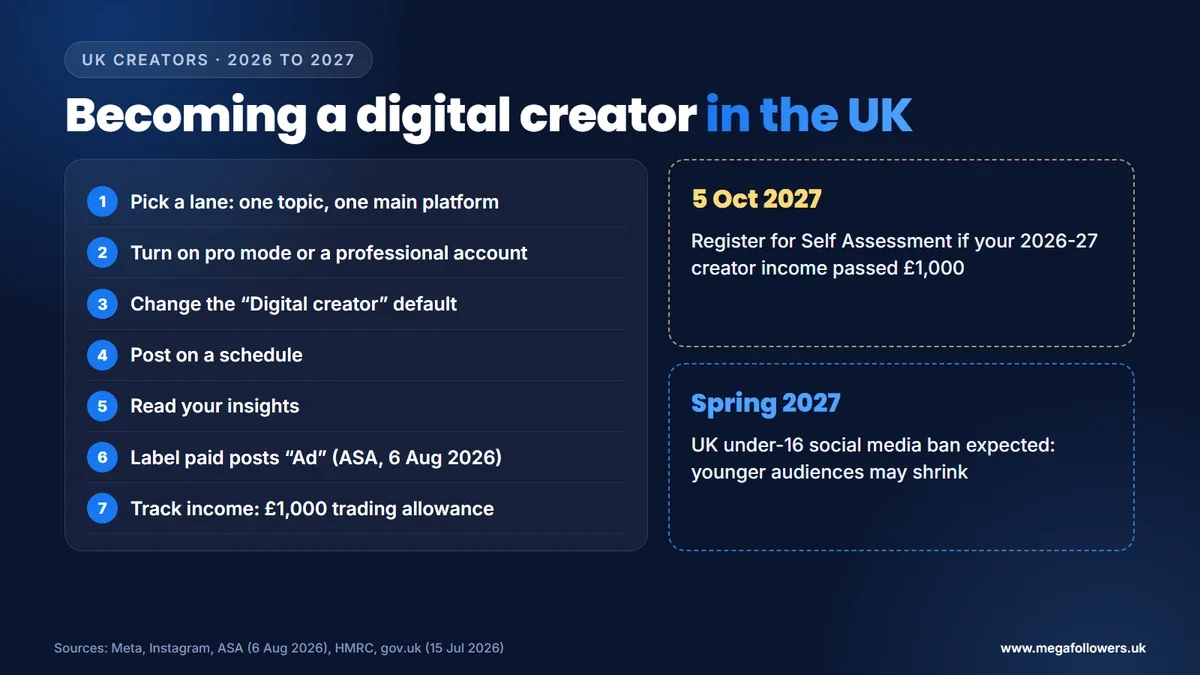
- Pick a lane. Choose one topic and one main platform. A clear niche helps people know why they should follow you.
- Switch on the tools. Turn on pro mode on Facebook, or switch to a professional account on Instagram, so you can see insights.
- Change the category. Replace the "Digital creator" default with something specific, so people know what you make.
- Post on a schedule. A steady stream of posts gives followers a reason to come back, and gives you more data to learn from.
- Read your insights. Check which posts bring followers, then make more of what works.
- Label every ad. The ASA's advice on recognising ads on social media, updated on 6 August 2026, expects a clear label upfront and names "Ad" as the most appropriate word.
- Track your income. HMRC's £1,000 trading allowance covers the first £1,000 of side income in a tax year. Above that, register for Self Assessment.
| Stage | What to do | Where |
|---|---|---|
| Set-up | Turn on pro mode or a professional account | Facebook profile, Instagram settings |
| Profile | Change the category, write a clear bio | Edit profile |
| Growth | Post on a schedule, read insights | Professional dashboard, Instagram insights |
| Money | Check monetisation eligibility (18+) | Facebook and Instagram creator tools |
| Rules | Label paid posts "Ad", track income | ASA guidance, HMRC |
On Facebook, pro mode opens two main ways to earn if you're eligible. Facebook content monetisation pays for quality public videos, Reels, photos, stories and text posts that perform well, and Subscriptions let fans pay for extra content.
Gifts count as income too. If a brand sends you free products in return for posts, HMRC treats them as income at their cost value, so add them to your running total.
What changes for digital creators in 2027
Two dated changes matter for UK creators in 2027. One affects what you owe, and the other affects who you can reach.
- Tax: income earned in the 2026-27 tax year, which ends on 5 April 2027, needs registering for Self Assessment by 5 October 2027 if it passes the £1,000 allowance.
- Younger audiences: the government said on 15 July 2026 that it expects its ban on social media services for under-16s to start in spring 2027. Creators whose audience skews young should expect it to shrink.
Our view: Meta keeps folding Page features into personal profiles through pro mode, so expect even more profiles to carry the "Digital creator" default through 2027. Changing your category is the easiest way to stand out from the crowd.
A creator label is easy. A creator audience takes proof
Anyone can switch on pro mode. What makes a new visitor take a creator seriously is proof that other people already follow, like and watch.
Mega Followers UK helps with that first impression. Instagram followers, Facebook followers and Instagram likes come from real-looking accounts, with no password required and a 30-day refill guarantee. For the long game, read how to earn from Facebook, how to get business as an Instagram influencer and how the Instagram algorithm works, or see our FAQs.
FAQ: digital creator meaning
Why does my Facebook profile say Digital creator?
You've switched on professional mode. Meta's help pages say that when you turn on pro mode, your profile is set to the Digital creator category by default. Change it from your profile: tap More options, select Edit, then edit the details under your bio and pick a category that fits.
Can a digital creator see who viewed their Facebook profile?
No. Facebook says it doesn't let people track who views their profile, and third-party apps can't do it either, so a Digital creator label gives no extra access. Pro mode does add insights about your followers, reach and engagement, but those are totals with no names attached.
Do digital creators get paid on Facebook?
Only if they're eligible. Pro mode gives access to monetisation tools for people who meet Facebook's eligibility standards, and people under 18 aren't eligible at all. The label earns nothing by itself, because payment depends on the content you post, the programme you join and that programme's rules.
Is digital creator a real job?
Yes. Plenty of people earn a living from content through brand deals, ad revenue, subscriptions and selling their own products, and many more do it part-time. Some never earn at all. In the UK, income above HMRC's £1,000 trading allowance in a tax year means registering for Self Assessment.
How many followers does a digital creator need?
None. Anyone who makes content for an audience counts, and Facebook adds the label to any profile in pro mode, whatever its size. Follower numbers matter later, because monetisation programmes and brands set their own thresholds and check audience size before they work with you.
How do I hide the category on my Instagram profile?
Go to your profile and tap Edit profile. Then open Profile display, under Public business information, where you can show or hide your category label and contact details. Hiding it only changes what visitors see, so your account stays a professional account with all the same tools and insights.