How Much Is a Galaxy on TikTok? UK Gift Prices in Pounds for 2026 and 2027
How much is a Galaxy on TikTok in pounds? UK gift and coin prices from the App Store, how Diamonds work, what creators get and the 18+ rules for 2026.
In this article
Quick answer: A Galaxy on TikTok costs 1,000 coins, which works out at about £12.81 to £14.75 in the UK, depending on which App Store coin pack you buy. A Lion (29,999 coins) comes to roughly £384 to £442. TikTok doesn't publish a gift price list, so check the coin cost shown under each gift in your app.
Someone sends a Galaxy during a LIVE, the screen fills with stars, and the chat wants to know: how much is a Galaxy on TikTok? Most answers online are in US dollars, no help when you pay in pounds.
Worse, TikTok doesn't publish a price list at all. This guide works out UK prices from the coin packs on Apple's UK App Store, explains how coins, gifts and Diamonds connect, and shows what TikTok actually says about creator pay.
How much is a Galaxy on TikTok? UK prices in pounds
A Galaxy costs 1,000 coins. Its price in pounds depends on what you paid for those coins. On the UK App Store, TikTok's coin packs cost between 1.28p and 1.48p per coin. That puts a Galaxy at £12.81 if you buy coins in the better-value packs, and £14.75 if you buy them in the smallest ones.
TikTok's Virtual Items Policy says the number of coins a gift needs depends on the type of gift, and TikTok shows that number before you use your coins. TikTok doesn't publish a full list, so the coin costs below come from gift catalogues and creator guides. Confirm each one under the gift in your app before you send it.
| Gift | Coin cost (catalogue) | UK price at 1.28p a coin | UK price at 1.48p a coin |
|---|---|---|---|
| Rose | 1 | 1p | 1p |
| Finger Heart | 5 | 6p | 7p |
| Galaxy | 1,000 | £12.81 | £14.75 |
| Lion | 29,999 | £384.27 | £442.49 |
| TikTok Universe | 44,999 | £576.42 | £663.74 |
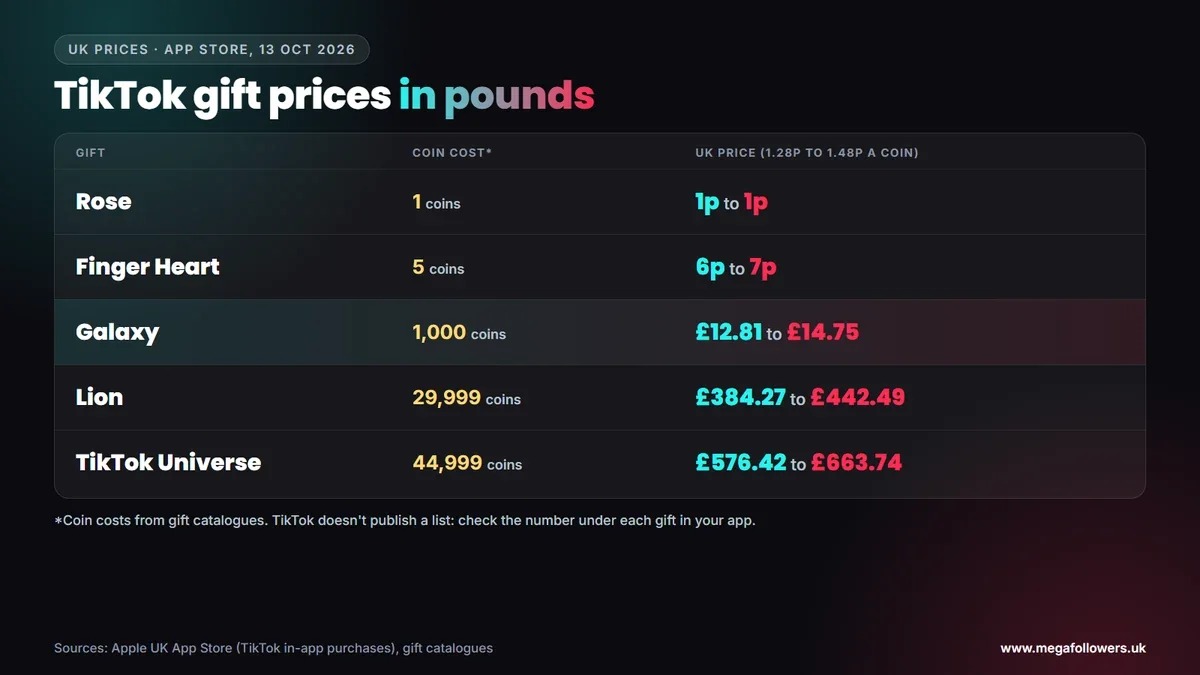
The Universe needs a note. Most catalogues list it at 44,999 coins, but at least one guide gives 34,999, which would put it at £448.32 to £516.24. TikTok changes and retires gifts over time, so the in-app number is the one that counts.
What most guides get wrong: they quote prices in US dollars as if they applied everywhere. UK buyers pay in pounds, at App Store prices, and smaller coin packs cost more per coin than larger ones.
TikTok coin prices in the UK
Apple's UK App Store listing for TikTok shows these coin packs, checked on 13 October 2026. The pence-per-coin column shows why pack size matters.
| Coin pack | UK App Store price | Cost per coin |
|---|---|---|
| 20 coins | £0.29 | 1.45p |
| 40 coins | £0.59 | 1.48p |
| 65 coins | £0.89 | 1.37p |
| 70 coins | £0.90 | 1.29p |
| 130 coins | £1.69 | 1.30p |
| 139 coins | £1.79 | 1.29p |
| 199 coins | £2.59 | 1.30p |
| 210 coins | £2.69 | 1.28p |
| 330 coins | £4.29 | 1.30p |
| 660 coins | £8.49 | 1.29p |
The pattern is simple: the 20 and 40-coin packs cost the most per coin, while packs from 70 coins upwards sit close to 1.3p. Apple only shows TikTok's most popular in-app purchases on the listing, so larger packs may be available inside the app at different rates.
Pack maths matters for big gifts. A single Galaxy needs 1,000 coins, and the closest combination of listed packs is 660 + 330 + 20 coins, which gives you 1,010 coins for £13.07. Buying the same coins in 20-coin packs would cost £14.50.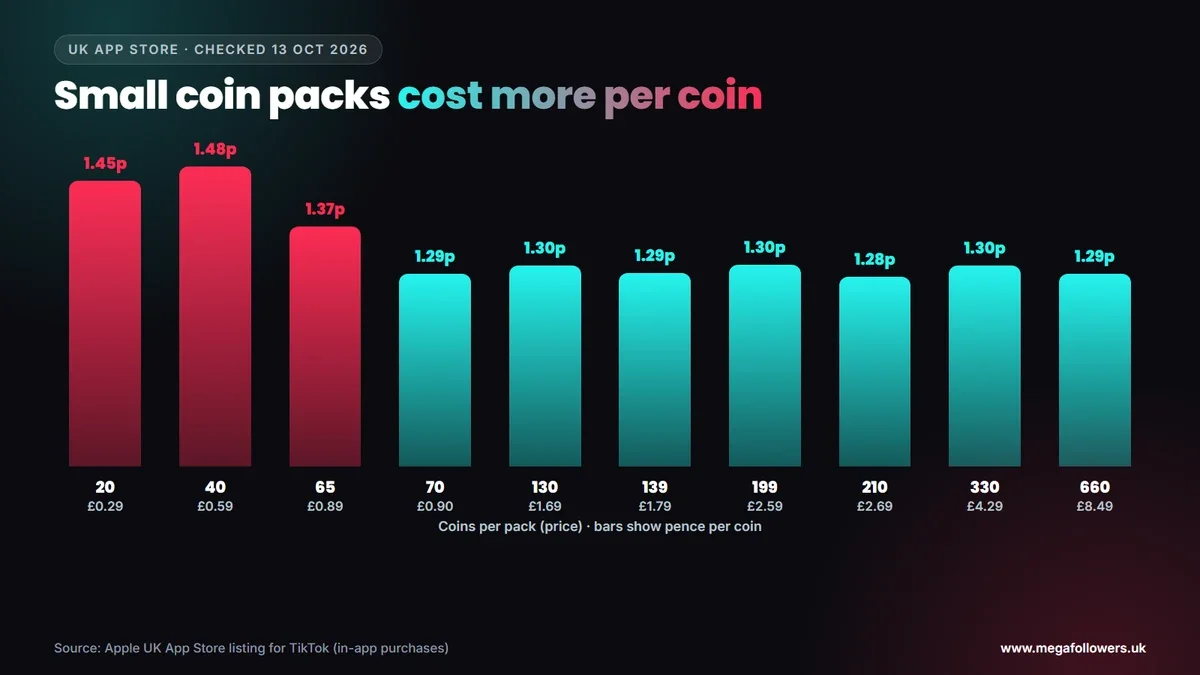
You can also buy coins on TikTok's website at tiktok.com/coin in countries where TikTok offers it. Prices there can differ from the app, so compare the two before a big top-up.
How TikTok gifts work: coins, gifts and Diamonds
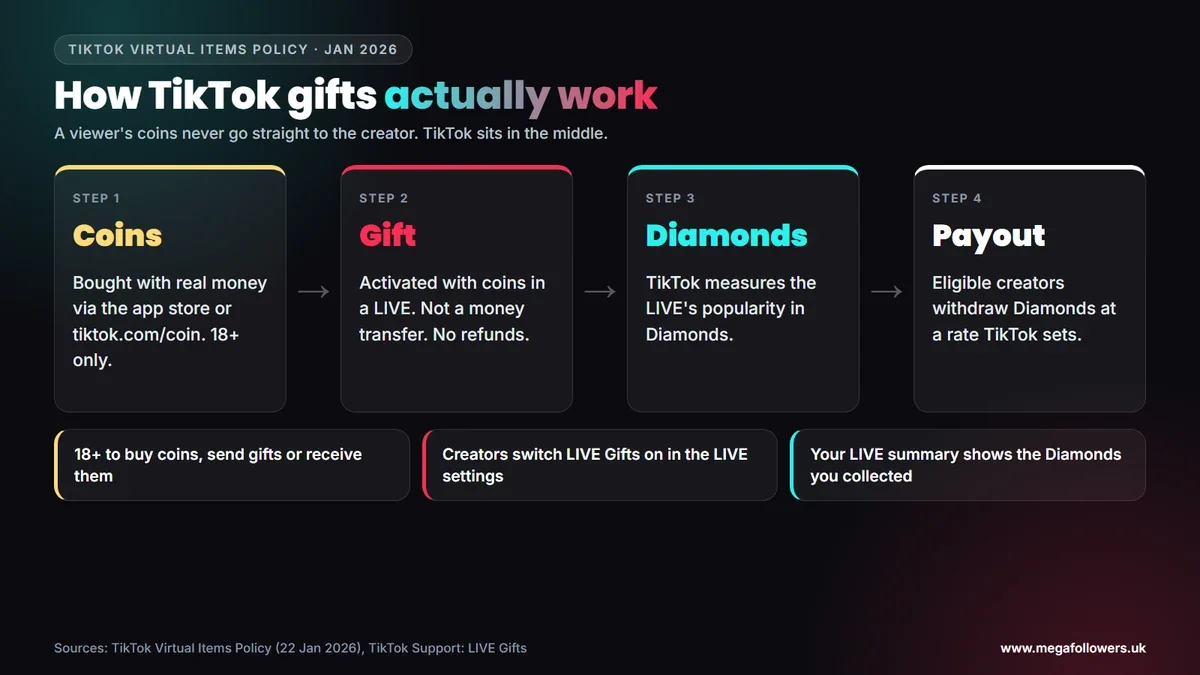
Gifts run on three layers, and TikTok's Virtual Items Policy (updated 22 January 2026) defines each one. You need to be at least 18 to buy coins.
- Coins: you buy them with real money, through an app store or TikTok's website where it's available.
- Gifts: you activate a gift with coins during a LIVE. TikTok says gifting isn't a transfer of money, coins or anything of value to the creator, and gifts aren't refundable once used.
- Diamonds: TikTok uses the type and number of gifts in a LIVE to measure how popular the content and creator are, and records that popularity in Diamonds.
- Payout: TikTok's policies let eligible creators withdraw Diamonds for money, at a conversion rate TikTok sets and can change.
Coins aren't only for gifts. The same policy says you can spend them on other virtual items and services that TikTok offers from time to time, such as its Promote advertising service and Star Comments.
That structure explains a lot of confusion. A viewer who spends £12.81 on a Galaxy hasn't sent the creator £12.81; they've activated a gift, and TikTok then decides how many Diamonds that popularity is worth.
What you get when you send a Galaxy
You get recognition. TikTok's policy says that when you send a gift, other people in the LIVE can see your username and the gift you sent, and it describes gifting as a way to show appreciation and interact with content you enjoy.
That public moment is the point for most viewers. A Galaxy lands on screen with your name attached, and creators often thank big gifters by name during the stream. Remember the trade-off, though: the coins are gone the moment you send it, with no refund.
How much does a creator get from a Galaxy?
TikTok doesn't publish a fixed figure. Its policy says the conversion of gifts into Diamonds, and of Diamonds into money, happens at a rate TikTok determines and can change at its discretion. Any guide that quotes an exact payout per Galaxy is estimating.
Creators can see their own numbers. TikTok's Creator Academy says the LIVE tab in TikTok Studio analytics shows the number of Diamonds you collected, alongside LIVE views, new followers and total LIVE time, over the last 7 to 28 days.
Here's a worked example. A creator who receives three Galaxies in one LIVE has had viewers spend roughly £38 to £44 on coins, but what the creator earns depends entirely on the Diamond rate TikTok applies. So treat gifts as a bonus. If you're planning income from LIVE, track Diamonds per stream in your own analytics for a month before you count on them.
Who can send and receive TikTok gifts in the UK?
You must be 18 or over to buy coins and send gifts, and creators must be 18 or over to receive them. TikTok raised the age to 18 for buying, sending and receiving gifts in December 2019, and its current policy still requires users to be at least 18 to buy, use or collect coins and Diamonds.
Under-18s can't take part in gifting at all. Parents worried about spending can also manage in-app purchases through the app store settings on their child's phone.
Creators need to switch gifts on. TikTok's support page on LIVE Gifts lists four requirements:
- You live somewhere LIVE Gifts is available.
- You're 18 or older (19 in South Korea).
- You're eligible to go LIVE.
- Your account is in good standing under the Community Guidelines and Terms of Service.
To turn gifts on, tap Settings on the LIVE screen, switch LIVE Gifts on, then tap Go LIVE. Government, politician and political party accounts can't collect Diamonds through gifts. At the end of each LIVE, your summary shows the total Diamonds collected.
What could change in 2027
The UK government said on 15 July 2026 that it expects its ban on social media services for under-16s to come into force in spring 2027. Gifting is already 18+, so the direct effect on gifts should be small, but LIVE audiences that skew young may shrink.
Our view: coin prices follow app store pricing, which changes from time to time, and TikTok adds and retires gifts regularly. Re-check the App Store listing and the in-app coin costs before any big purchase in 2027, and treat every price table online, including this one, as a snapshot.
Gifts reward a LIVE, but an audience makes one
Gifts only arrive when people are watching. A LIVE with a busy viewer count looks worth joining, and a profile with a solid following gives newcomers a reason to stay.
Mega Followers UK helps with that first impression. TikTok LIVE stream views, TikTok followers and TikTok likes come from real-looking accounts, with no password required and a 30-day refill guarantee. For other income routes, read how to make money on TikTok and how the TikTok algorithm works, or see our FAQs.
FAQ: TikTok gift prices in pounds
How much is a Universe on TikTok in pounds?
Most gift catalogues list a TikTok Universe at 44,999 coins, which works out at about £576 to £664 at UK App Store coin prices. One guide lists it at 34,999 coins instead, roughly £448 to £516. TikTok doesn't publish an official price, so check the coin cost under the gift in your app.
How much is a Lion on TikTok in pounds?
Gift catalogues list a Lion at 29,999 coins, which comes to about £384 to £442 in the UK, depending on the coin pack you buy. You'd pay the lower figure buying packs of 70 coins or more from the App Store. Confirm the coin cost shown under the gift before you send one.
What is the cheapest gift on TikTok?
Catalogues put the Rose at 1 coin, about 1p in the UK, which makes it the cheapest common gift. The Finger Heart, at 5 coins, costs around 6p to 7p. Gift line-ups change and vary, so your app may show other low-cost gifts alongside these.
Can you get a refund on TikTok gifts?
No. TikTok's Virtual Items Policy says you use up a gift the moment you activate it, so gifts aren't returnable or refundable. Coins bought through the App Store or Google Play fall under those stores' own refund rules, so contact the store rather than TikTok about a coin purchase.
How do I buy TikTok coins in the UK?
You can buy coins inside the TikTok app through the App Store or Google Play, or on TikTok's website at tiktok.com/coin where TikTok offers it. You must be 18 or over. Smaller packs cost more per coin, so the 70-coin pack and above give better value on the App Store.
Can under-18s send gifts on TikTok?
No. TikTok only lets people aged 18 or over buy coins, send gifts or receive gifts, a rule it introduced in December 2019. Younger users can't take part in gifting at all. Parents can also limit in-app purchases through the phone's app store settings.