How to Earn from Facebook: 6 Ways to Make Money on Facebook in 2026
How to earn from Facebook in 2026: six routes, the real entry bar for each, Creator Fast Track pay, Stars, brand deals and the UK tax rule to know.
In this article
Quick answer: How to earn from Facebook in 2026: pick one of six routes. Content Monetisation runs on invitation, Creator Fast Track needs 100,000 followers on another app, and Stars needs 500 followers held for 30 days. Brand deals, selling and affiliate links have no Meta minimum. UK earners report to HMRC above £1,000.
You post every week, your Reels pick up views, and the Monetisation tab still shows nothing to switch on. Most guides blame your follower count and quote a 10,000-follower rule that Meta no longer publishes for its main programme. So people chase the wrong number for months. This guide shows how to earn from Facebook route by route: the real entry bar for each, what it pays, and the UK tax rule that follows the first payout.
Which Facebook payout route can you use today?
Stars is the route most Pages can open first, because Meta asks for 500 followers held for 30 consecutive days. Everything else splits into two camps: programmes Meta controls, and money you arrange yourself with brands or buyers.
Meta's own programmes carry a gate. The routes you run yourself don't. For example, a 3,000-follower Page selling handmade candles can out-earn a 40,000-follower meme Page that sits waiting on an invite.
| Route | Entry bar | How it pays | Best fit |
|---|---|---|---|
| Content Monetisation | Invitation only; you can register interest | Payouts based on engagement, watch time and qualified views | Regular Reels, photo and text posters |
| Creator Fast Track | 100,000+ followers on TikTok, Instagram or YouTube | $1,000 a month for three months ($3,000 at 1M+) | Creators moving over from another app |
| Stars | 500 followers for 30 consecutive days | 1 cent from Meta per Star | Live streamers and video creators |
| Brand deals | No Meta minimum; each brand sets its own | A fee you agree with the brand | Niche Pages with a clear audience |
| Selling (Marketplace, your shop) | A Facebook account and something to sell | Your sale price | Makers, resellers, local businesses |
| Affiliate links | No Meta minimum; the affiliate scheme sets terms | Commission per sale | Review, deals and how-to Pages |
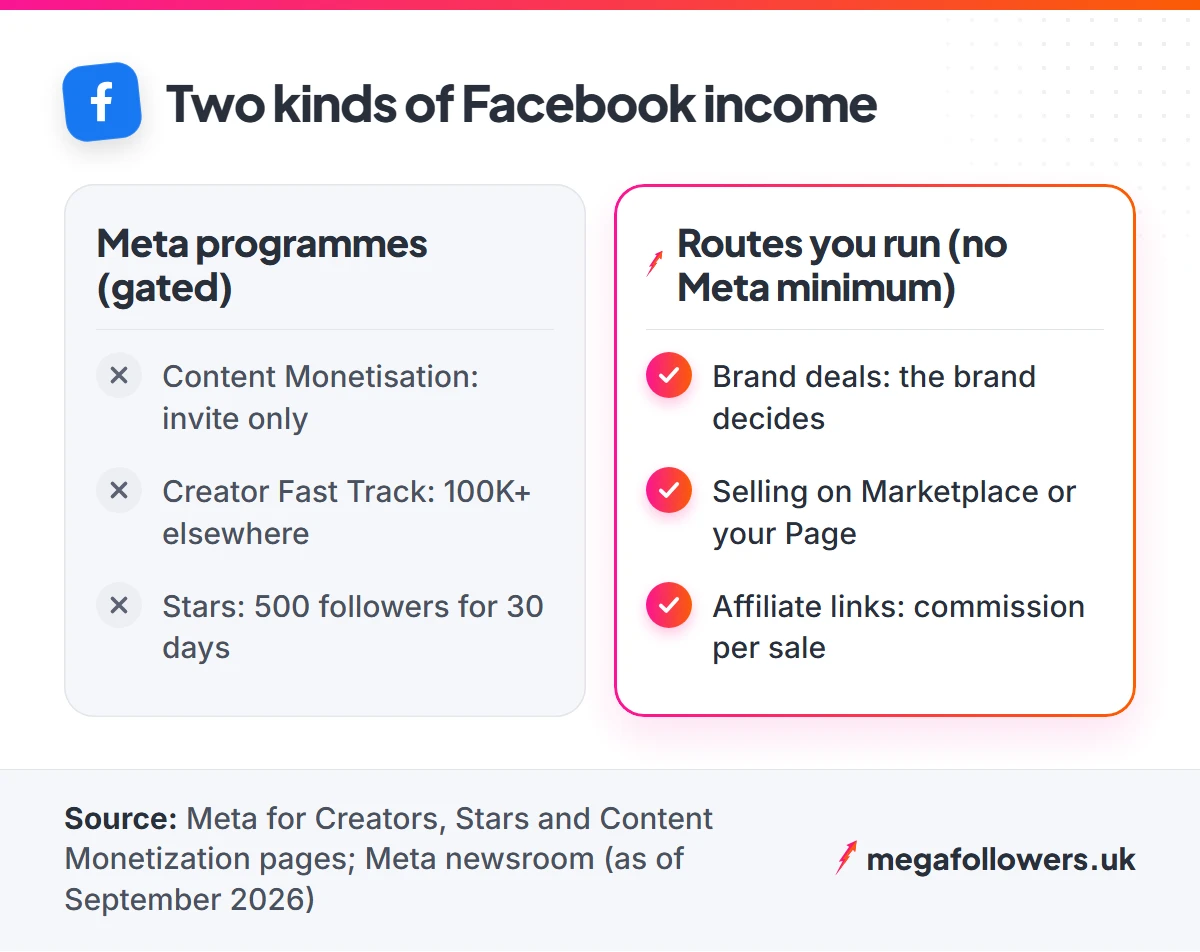
The verdict from the table is simple. Start one route you control today and register interest in Meta's programme at the same time. Waiting for an invite as your only plan is how Pages stall.
One exception changes the order. If you already have 100,000 followers on another app, apply for Creator Fast Track first, because it is the only route on the list with pay Meta guarantees in advance.
Facebook Content Monetisation: how the invite works
You can't apply for Content Monetisation right now; you can only register interest and wait. The creator site says the programme is invite-only, with invitations sent out periodically to eligible creators, and it pays on Reels, photos, text posts and Stories.
Invitations are going to millions of creators this year, the site adds, with open enrolment promised "in the near future". No date yet. Here is how to put your name forward:
- Switch your profile to professional mode, or post from a Facebook Page.
- Open your professional dashboard and tap the Monetisation tab.
- Tap Content Monetisation and fill in the interest form.
- Watch for the invite in the Facebook app, your email or Meta Business Suite.
Treat any "invite" that arrives by DM from a stranger as a scam. Those three official channels are the only ones listed.
While you wait, give the invite a reason to arrive. Post original Reels on a steady schedule, reply to comments within the first hour, and keep your Page free of reposted clips. Check the Monetisation tab once a week, since that is where eligibility changes show up first.
What most guides get wrong: Many 2026 guides still say you need 10,000 followers and 600,000 minutes viewed in 60 days. Those figures come from the older in-stream ads requirements. Meta's Content Monetisation page lists no follower minimum at all, so a smaller Page with strong engagement can still receive an invite.
Where the 2025 money went
Meta paid Facebook creators close to $3 billion over 2025, a 35% rise on 2024 and its highest yearly total, according to its March 2026 announcement. Reels took 60% of that payout. Stories, photos and text posts shared the remaining 40%.
That split tells you where to spend your filming time. Make Reels the core of your week, then keep photo and text posts going, because they earn under the same programme and cost minutes to make. Creators clearing $10,000 in a year on Facebook also rose by more than 30% against 2024, the same post reports.
Creator Fast Track: guaranteed pay for creators from other apps
Creator Fast Track pays established creators a fixed monthly sum for three months to post Reels on Facebook. Meta launched it on 18 March 2026, and the Creator Fast Track announcement sets two tiers.
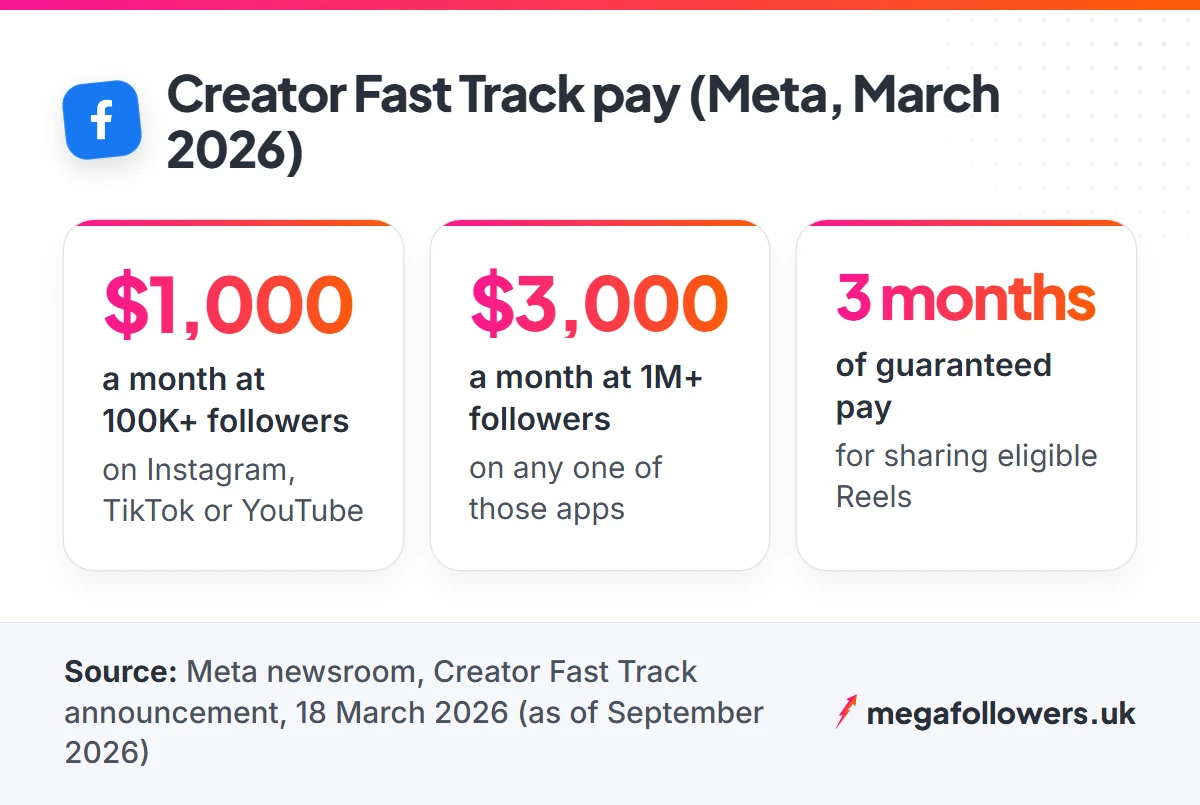
- 100,000+ followers on TikTok, Instagram or YouTube: $1,000 a month.
- Over 1 million followers on any one of those apps: $3,000 a month.
Accepted creators also get a reach boost on eligible Reels plus instant entry to Content Monetisation, and that second perk matters most, because earnings can continue once the guaranteed three months run out. Meta states both sums in US dollars.
Some guides put the bar at 20,000 followers. Wrong. The announcement says 100,000, and it doesn't list countries either, so check the Creator Fast Track application on Meta's creator site before you plan a month's content around it.
Applying takes one form, reached from the Earn Money section of Meta's creator site. After acceptance, the guaranteed pay depends on you sharing eligible Reels, so line up a full month of finished videos before you send the form. For example, a TikTok creator with 250,000 followers whom Meta accepts would collect $1,000 a month, or $3,000 across the three months, as long as the Reels keep going up. After month three, whatever Content Monetisation pays takes over, so the real prize is the audience you build during those twelve weeks.
Facebook Stars: the 500-follower door
Stars lets fans pay you directly while they watch, and Meta's Stars eligibility rules ask for 500 followers, held for 30 days in a row. Stars must also run in your country, and you have to follow the Community Standards and Partner Monetisation Policies, and accept the Stars terms.
Meta pays 1 cent for every single Star a fan sends. The maths is blunt. For example, a Live session where viewers send 2,000 Stars in total earns $20, so Stars rewards frequent Live streams far more than occasional uploads.
Turn Stars on the day you qualify anyway. It costs nothing, fans can send Stars during Lives and on videos, and it gives your most loyal viewers a way to back you before any brand does.
The on switch lives in the Monetisation tab of your professional dashboard. Once it is on, say it out loud on your next Live, thank each sender by name, and pin a short post explaining what Stars are. Most viewers have never sent one, so a ten-second explainer does more than any gimmick. Regular Live slots help as well, because fans who know when you'll appear turn up ready to send Stars.
Brand deals on a Facebook Page
Brand deals need no Meta threshold, because the brand decides who to pay. What a brand's marketer checks first is predictable: follower count, recent engagement, and whether your audience lives where their customers do.
That first glance matters more than creators like to admit. A Page with a thin like count often never reaches the conversation about rates, which is why some Pages add Facebook Page likes as social proof before they start pitching. If the brand sells only in Britain, an audience with UK-based Facebook followers answers the location question before they ask it.
Label every paid post clearly. The ASA's advice on recognising ads on social media, updated on 6 August 2026, expects a prominent "Ad" label at the start of the post. Words like "sponsored" or "gifted" don't meet that standard on their own. Meta's paid partnership label may be enough only when it sits upfront and in clear view, so the safest habit is to use it and add "Ad" as well.
When you pitch, keep the email under 150 words. Send proof with it:
- a screenshot of your Page insights for the last 28 days
- where your audience lives, by country and top cities
- two post ideas written for that brand's product
- your rate, or a line saying you'll quote per brief
Follow up once, a week later. Silence after that means no, and your time is better spent on the next brand.
Selling on Facebook: Marketplace, your Page and affiliate links
Selling is the fastest route to your first pound, because a buyer pays you the moment a deal closes. Marketplace suits one-off items, like a sofa or a used bike. A Page, by contrast, suits anything you make or stock again and again, and four selling models work well on one:
- Your own products: candles, prints, baked goods, digital templates. Post the product in use, then link to your shop.
- Services: photography, tutoring, repairs, dog walking. A Page with genuine reviews and a clear booking link does the job of a basic website.
- Affiliate links: you earn a commission when a follower buys through your link. The ASA treats any post that refers to a product with an affiliate link as advertising, so it needs the same "Ad" label as a paid deal.
- Pre-orders and drops: announce a limited batch, open orders for 48 hours, then close them and post the sold-out screenshot.
Whichever you choose, answer Messenger enquiries fast. A buyer left waiting for a day has plenty of other sellers one scroll away.
Pick one model. Repeat it every week until buyers start recognising your posts in their feed, because a Page that sells the same thing reliably earns trust faster than one that jumps between ideas.
How to earn from Facebook in the UK without a tax surprise
The first £1,000 of trading income each tax year falls under HMRC's trading allowance, and above that you must register for Self Assessment. The tax year runs from 6 April to 5 April.
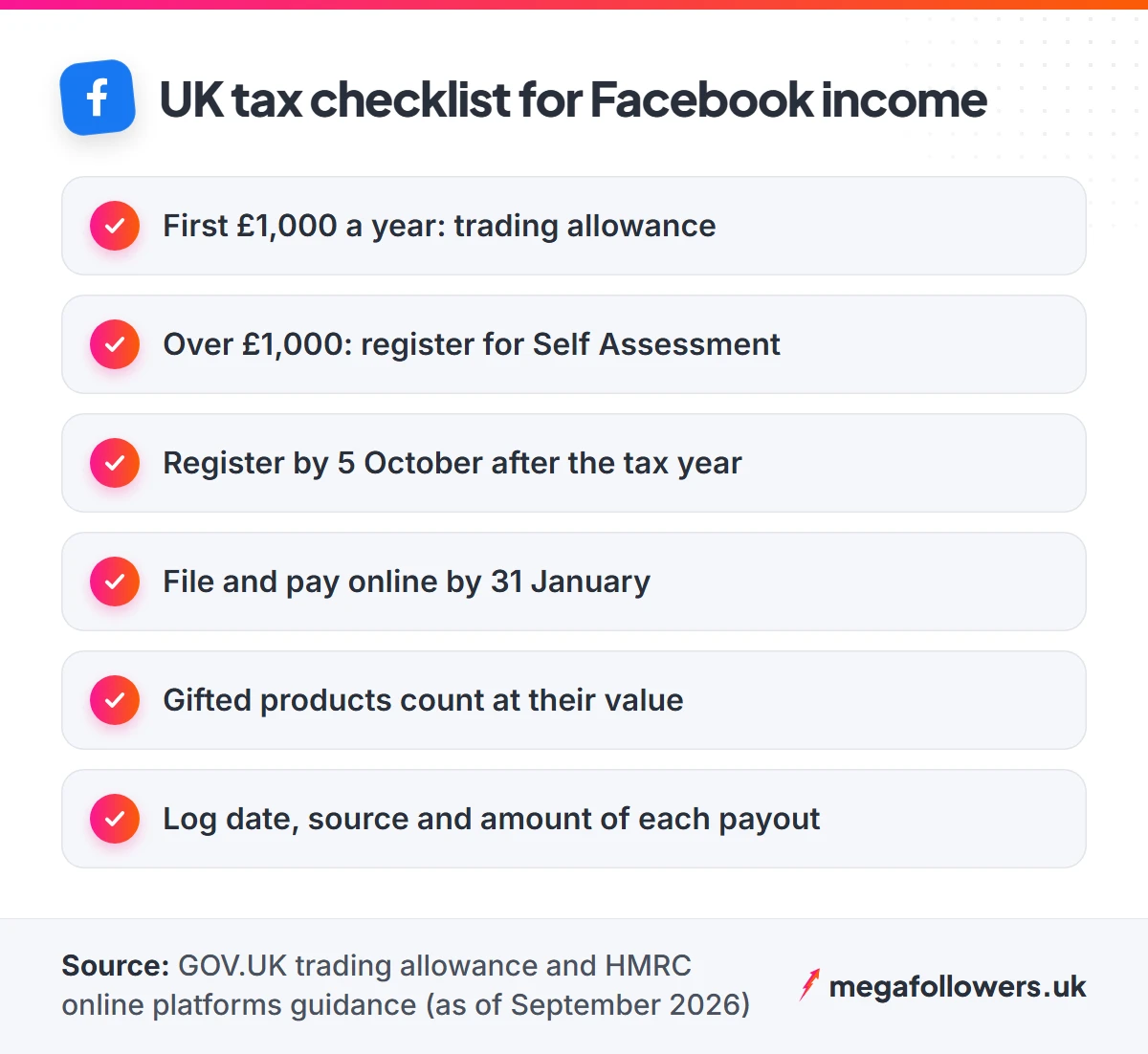
Two details catch UK creators out, and both come straight from HMRC. HMRC's guidance on income from online platforms says gifts and services you receive for promoting products count as income, valued at what they would have cost you. And the £1,000 covers all your trading income combined, so Stars, brand fees, affiliate commission and product sales add up together.
Keep a simple spreadsheet from your first payout: date, source, amount, and the value of any gifted item. That record makes your first tax return a one-evening job. For anything beyond these basics, speak to an accountant.
Deadlines matter too. If you cross £1,000 for the first time, register for Self Assessment by 5 October after the tax year ends, then file online and pay by 31 January. Missing that January date triggers an automatic penalty, even when you owe very little. Set a calendar reminder the day your first payout lands, and put aside a share of every payment so the bill never comes as a shock.
What gets Facebook earnings switched off
Three habits put Facebook earnings at risk, and reposted clips top the list. Meta can remove eligibility for content that breaks its Community Standards, and that includes intellectual property, so uploading other people's videos puts every route Meta controls at risk.
Engagement bait comes next. Posts that beg for reactions ("like if you agree", "share to win") lose distribution under Meta's rules, and a Page that relies on them loses the reach its earnings depend on.
Fake engagement is the third trap. Meta's Partner Monetisation Policies say a creator may lose monetisation if the audience consists significantly of fake likes, follows or views. Bot traffic is the problem there. Keep any paid boost modest next to your organic following, and buy only from a seller that delivers from real-looking accounts.
Check your standing every month. The Monetisation tab shows your eligibility status for each tool, which gives you time to fix or delete a post before an issue spreads to the whole Page.
Reach gets you paid. Proof gets you picked.
Every route above pays in proportion to two things: how many people see your posts, and how credible your Page looks when a brand, buyer or fan lands on it. Content drives the first. Social proof helps the second, and it is the part most small Pages neglect.
If your Page needs a head start, a measured order of Facebook followers lifts the number brands see first, and Facebook video views give a new Reel early momentum. Facebook post likes do the same for a launch or product post. Start small, watch how the numbers sit next to your organic growth, and scale from there. Every order comes from real-looking accounts, needs no password, and carries our 30-day refill guarantee.
Selling to a British audience? Our guide to UK targeted followers explains when a UK-only audience is worth it. Our help and FAQs page covers orders, delivery and refills.
Frequently asked questions
How many followers does a Facebook Page need before it earns?
It depends on the route. Stars needs 500 followers kept for 30 days, and Creator Fast Track needs 100,000 on TikTok, Instagram or YouTube. Content Monetisation publishes no follower minimum and works by invitation. Brand deals, selling and affiliate links have no Meta threshold at all, so you can start those today.
How much does Facebook pay per 1,000 views?
There's no fixed rate per 1,000 views. Content Monetisation pays according to engagement, watch time and qualified views, so two videos with the same view count can earn different amounts. Treat any single per-1,000-views figure you see online as one creator's result rather than a rate Meta guarantees.
Can you earn money from a personal Facebook profile?
Yes. Switch your personal profile to professional mode and you get the professional dashboard and the Monetisation tab, where you can check eligibility and register interest in Content Monetisation. You keep your friends list, and your posts can reach followers who aren't friends. From there, the same eligibility rules apply as they would to a Page.
How long does a Content Monetisation invite take?
Nobody outside Meta knows. The creator site says invitations go out periodically, to millions of creators this year, with open enrolment planned soon. Register interest through the Monetisation tab, keep posting original Reels, and check the Facebook app, your email and Meta Business Suite for the invite.
Do Facebook Stars count as taxable income in the UK?
Yes. HMRC counts income from creating online content as trading income, so Stars payouts sit alongside any brand fees, affiliate commission and sales you make. If your total trading income passes £1,000 in a tax year running 6 April to 5 April, register for Self Assessment. Below that, the trading allowance usually covers it.
Can you make money on Facebook by reposting other people's videos?
No. Facebook can remove monetisation from content that breaks its Community Standards, including intellectual property rules, so reposted clips put your whole Page at risk. A brand scrolling your Page will spot recycled clips too. The safe rule is simple: post only content you made yourself or have written permission to use.