How to Go Live on TikTok in the UK With GTA 6 (2026 and 2027 Guide)
How to go live on TikTok with GTA 6 in the UK: the 3 setups that work from a PS5 or Xbox, the 18+ rule, and the settings to switch on first.
In this article
Quick answer: To go live on TikTok in the UK you must be 18 or over and meet TikTok's follower bar, which varies by region. PS5 and Xbox can't stream straight to TikTok, so run the console through a capture card into a computer, then go live with TikTok LIVE Studio or OBS. Switch on Audience Controls for GTA 6.
Working out how to go live on TikTok with GTA 6 should take seconds. The game came out on 19 November 2026, so you press Create on your PS5, pick Broadcast and look for TikTok. It isn't there.
Sony only offers Twitch and YouTube. Below are three setups that do work, the UK age rules, and how to keep an 18-rated stream within TikTok's guidelines. For a fuller room, add TikTok LIVE viewers.
Who can go LIVE on TikTok in the UK?
You can go LIVE on TikTok in the UK once you're 18 and your account clears a follower minimum. TikTok sets both rules, and neither has a workaround.
The age rule is the one most guides still get wrong. Older articles say 16. TikTok's LIVE Safety Guide says creators must be at least 18 to go LIVE, and you also need to be 18 to send or receive LIVE Gifts. That second part matters for GTA 6 streamers who hope to earn, and we come back to it below.
The follower rule is vaguer, on purpose. TikTok says the number "may vary by market", so a figure quoted for the US doesn't settle it for a UK account. We've covered the threshold, and how to check your own, in our guide to how many followers you need to go live.
Here's how to tell where you stand right now. It takes about ten seconds in the app:
- Tap Create (+) and swipe the bottom menu. If LIVE appears, you're eligible on mobile.
- No LIVE option? You haven't met the bar yet, or your account has a restriction.
- Desktop tools need extra access. TikTok says desktop LIVE options "may vary by account and region", and LIVE Studio has its own access step.
- Account standing counts. Recent Community Guidelines strikes can block LIVE even when the numbers look fine.
Check this first. Every setup below, from the capture-card routes to the phone-only option, assumes the LIVE option already shows on your account.
Why you can't broadcast GTA 6 straight to TikTok from a PS5
A PS5 can't broadcast to TikTok because its built-in Broadcast feature only supports Twitch and YouTube. PlayStation's broadcast guide lists those two services and no others. TikTok isn't one of them.
That's the wall most new streamers hit on launch night. You press the Create button mid-mission, pick Broadcast, link an account and scroll, and the menu simply has no TikTok tile anywhere. Restarting won't help. Neither will reinstalling the TikTok app on your phone, because the limit sits in the console's software, not your account.
Xbox Series X|S owners end up in the same place. The console's own streaming menu doesn't offer TikTok either. Same problem, same fix.
So you need a middleman between the console and TikTok. Your console sends its picture out of the HDMI port as normal, and something in between turns that picture into a stream TikTok will accept. In practice that's a computer with a capture card, or your phone.
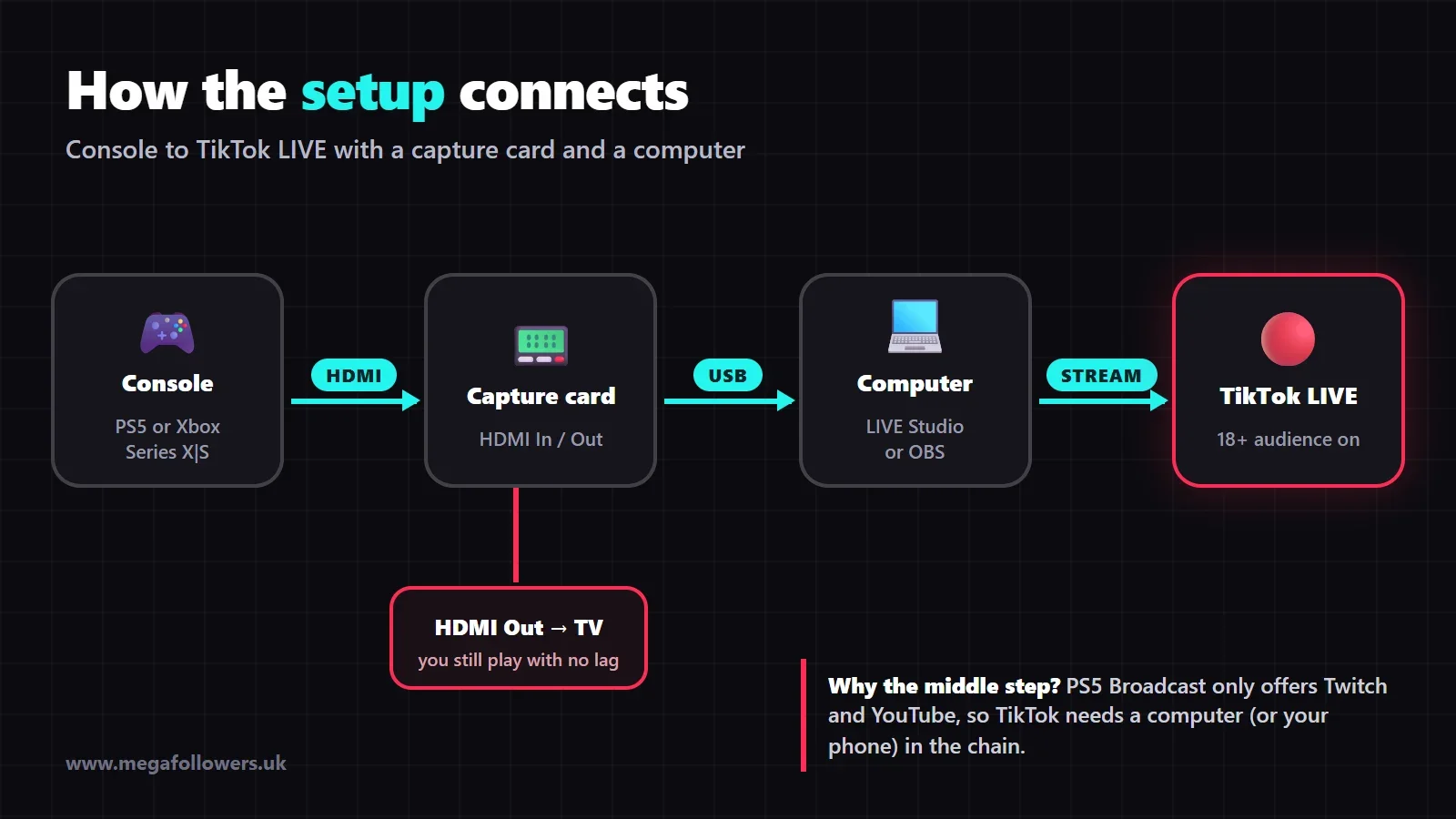
One upside: a computer in the chain gives you far more control than PS5 Broadcast ever did, with overlays, a facecam, chat on screen and proper audio mixing all in one place. Twitch streamers have worked this way for years.
How to go live on TikTok with GTA 6: 3 setups
There are three working ways to go live on TikTok with GTA 6, and the right one depends on the kit you already own and which TikTok tools your account can use. The table sums them up. Each setup gets its own steps below.
| Setup | Kit you need | TikTok access needed | Picture quality | Best for |
|---|---|---|---|---|
| Capture card + LIVE Studio | Console, HDMI capture card, compatible computer | LIVE access plus LIVE Studio access | Sharp, full game feed | Most UK streamers starting out |
| Capture card + OBS | Console, HDMI capture card, computer, OBS (free) | A Server URL and Stream Key from TikTok | Sharp, full control | People who already stream elsewhere |
| Phone only | Your phone and a tripod or stand | Standard mobile LIVE | Lower, filmed off the TV | Testing the waters with no spend |
Setup 1: capture card + computer + TikTok LIVE Studio
LIVE Studio is TikTok's own desktop app, and it's the simplest route for console players. It reads your capture card as a source, so you don't need to learn streaming software, and it posts straight to your account with no keys to copy.
Any HDMI capture card that your computer recognises will do. Check two specs before you buy: it should pass through the resolution your TV uses, and it should record at 1080p and 60 frames per second, which is plenty for a vertical TikTok feed.
Wire the kit first. Run an HDMI cable from the PS5 or Xbox into the capture card's HDMI In port. Then run a second HDMI cable from the card's HDMI Out port to your TV, so you still play on the big screen with no lag. Finally, plug the card into the computer with its USB cable, ideally into a USB 3 port on the back of the machine.
Next, set up the software. TikTok's official LIVE guide lists five steps, kept here in its order:
- Download and install LIVE Studio on a compatible computer.
- Open it and log in with your TikTok account.
- Add your sources. Choose the capture card as your game feed, then add a webcam and microphone if you want a facecam and commentary.
- Give the LIVE a title and set the options you need.
- Check the preview, then start the LIVE from LIVE Studio.
Before you go live, check one setting on the PS5. Go to Settings, then System, then HDMI, and switch off Enable HDCP, or the capture card may only show a black screen. Game audio travels over the same HDMI cable. Make sure LIVE Studio picks up sound from the card as well as your mic, or your viewers get commentary over silent gunfire.
One caution. LIVE Studio needs its own access, separate from mobile LIVE, and TikTok grants it account by account. If the app won't let you start, you don't have it yet. Setup 2 or Setup 3 still works in the meantime.
Setup 2: capture card + OBS with a TikTok stream key
OBS is free, open-source streaming software, and plenty of Twitch and YouTube streamers already use it. TikTok supports it through a stream key, which means you keep your existing scenes, overlays and alerts.
The wiring matches Setup 1. After that, TikTok's guide sets out five steps for OBS users:
- Open OBS and create a scene for your GTA 6 LIVE.
- Add sources: a Video Capture Device for the capture card, plus your mic and webcam.
- In OBS's streaming settings, paste the Server URL and Stream Key that TikTok provides.
- Check that both the game audio and your voice register on the mixer.
- Click Start Streaming.
Step 3 is the catch. TikTok issues the key, and not every account gets one, so this route depends on what TikTok has switched on for you.
Treat the key like a password. Anyone who has it can stream to your account. Never show it on screen, and never paste it into a Discord chat while you troubleshoot.
Setup 3: phone only
Phone-only LIVE costs nothing. It works for any account that can already go LIVE on mobile: you film the TV with your phone and stream it as a normal LIVE. TikTok's mobile steps are short, and you've probably seen them already:
- Open the TikTok app and tap Create (+).
- Swipe the bottom options and select LIVE.
- Add a title and cover image, then adjust the settings.
- Tap Go LIVE.
Expect a quality trade-off. A phone pointed at a television picks up glare, room light and the odd moiré pattern, and viewers notice within seconds. To soften that, mount the phone on a tripod square to the screen, turn the room lights down, and set the TV to its game picture mode.
Phone audio is the other weak spot. A cheap clip-on mic helps more than any camera setting.
Some creators try another trick: stream the console to the phone with PlayStation Remote Play or the Xbox app, then share the phone's screen on TikTok LIVE. We couldn't confirm that TikTok's mobile screen sharing reliably supports this in the UK, so test it privately first.
Tip: Phone-only is a good dry run. Do one short LIVE this way to learn the controls before you buy a capture card.
Make your GTA 6 LIVE safe for an 18-rated game
PEGI rates GTA 6 at 18, so treat every GTA 6 LIVE as adult content from the first minute. PEGI's listing flags extreme violence, sex and drug use, and TikTok expects creators to handle that kind of material carefully. Expect all three.
TikTok gives you a tool built for exactly this. Its LIVE Safety Guide tells creators whose LIVE includes sensitive themes or adult humour to turn on Audience Controls, which limit the stream to viewers aged 18 and over.
Switch it on in your LIVE settings before every single stream. It cuts your potential audience slightly. That's the point. Then work through the rest of the safety basics before you press Go LIVE:
- Add moderators. Pick one or two people you trust to mute and remove trolls while you play.
- Filter comments. Add keywords you don't want in chat, including spoilers and slurs.
- Flag spoilers in the title. During launch weeks, plenty of viewers haven't finished the story. "Spoiler-free" or "Mission 12 spoilers" in the title saves you a wave of complaints.
- Skip the most graphic scenes. Game content still has to follow TikTok's Community Guidelines, so a LIVE that lingers on gore risks being cut off.
Rockstar has its own rules as well. They apply on TikTok just as they do on YouTube. Its video policy asks fans not to post leaked pre-release footage, endings, or isolated cutscenes. Cutscenes are fine inside a longer play-through.
Rockstar also lists videos that promote cheating, glitch exploits or unofficial mods, and any of these can draw a takedown. Keep your GTA 6 LIVEs to straight play and you avoid the lot.
Your pre-LIVE checklist
Run this list ten minutes before every GTA 6 LIVE. Two minutes of checks now saves a stream you'd otherwise lose to a muted mic, a missing title or a chat full of spoilers.
- Audience Controls set to 18+. This is the non-negotiable one for GTA 6.
- Title names the game and the moment. "GTA 6 first heist, no spoilers" tells scrollers what they're joining. Vague titles like "chill stream" get skipped.
- Cover image chosen. Use a clear screenshot of your own gameplay. Rockstar's official artwork belongs to Rockstar.
- Moderators added and keyword filters switched on.
- Gifts decided. Turn LIVE Gifts on or off deliberately. Read the money section below first.
- Game audio checked. Talk, then fire a weapon in game, and watch both levels move in the preview.
- Upload speed tested. A wired Ethernet connection beats Wi-Fi for a stable stream.
- LIVE length planned. Decide on a rough finish time and say it at the start, so viewers know when to stick around.
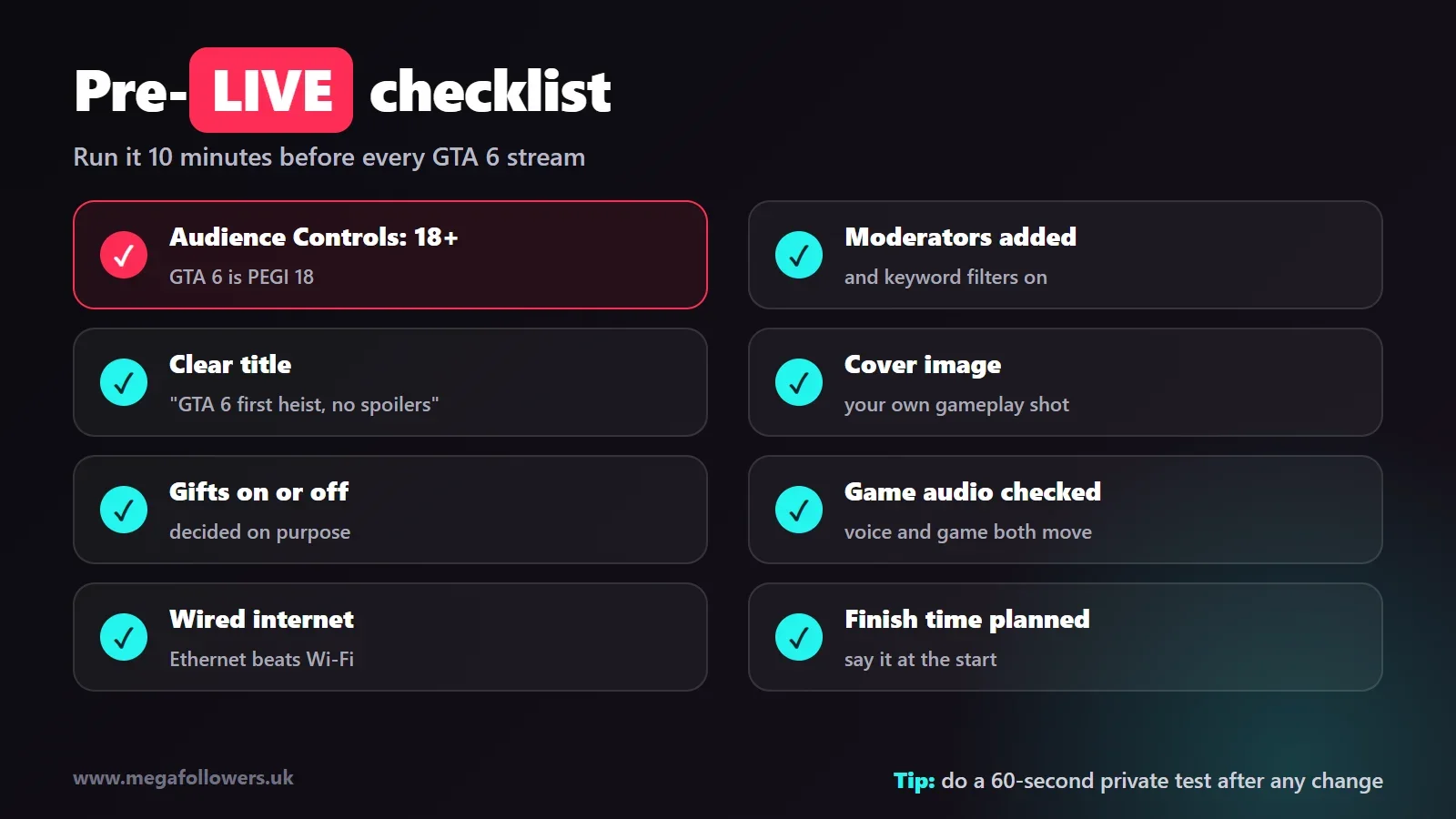
Do a 60-second private test if you've changed anything since last time. Audio problems are easy to miss from your side of the screen, and you can't fix them mid-LIVE without losing viewers. Fix it now. Fixing it live costs you the room, and many of those viewers won't come back.
Can you make money from a GTA 6 TikTok LIVE?
You can receive LIVE Gifts on TikTok if you and your viewers are 18 or over, but a GTA 6 LIVE carries a licensing question that most money guides skip. Start with how the money works, then weigh up the risk.
How Gifts work: viewers buy TikTok coins and spend them on Gifts during your LIVE. Coins cost real pounds. Our calculator shows TikTok coins prices in pounds for every pack.
Each Gift turns into Diamonds on your side, and TikTok sets the rate at which you can withdraw them. For the coin cost of individual Gifts, see what each TikTok gift costs.
What the earnings look like: gift income swings a lot from one LIVE to the next. Some nights pay nothing. For a rough sense of creator income across TikTok's options, our tool estimates what TikTok creators earn.
The Rockstar question: Rockstar's video policy covers non-commercial use only. In its words, "Non-commercial" means "you don't make money through the game footage you post". Taking Gifts on a GTA 6 stream sits outside that general permission.
Rockstar doesn't say it will act against gift-earning streamers, but Take-Two, Rockstar's parent company, "reserves the right to have its copyrighted material taken down at any time". Plenty of creators accept that risk, especially smaller streamers who treat Gifts as pocket money rather than income. Go in knowing it's there, and email Rockstar's copyright team (the address is on the policy page) if you plan a serious channel.
Our honest view: treat Gifts as a bonus until you see how Rockstar handles GTA 6 streams in practice. Don't build a business plan on them yet.
Grow the audience for your GTA 6 LIVEs
The fastest way to grow GTA 6 LIVEs is to feed them with short clips, because most people find a LIVE through a video they liked first. Your LIVE is the main event. Clips are the trailers.
After each stream, cut three or four 15 to 40-second moments: a chase that went wrong, a heist that went right, a funny NPC. Post them across the week, mention when you're next live in the caption, and check the best time to post on TikTok for UK audiences before you fix a schedule. Timing matters.
Social proof does the rest. People scroll past an empty LIVE and stop for a busy one, the same way you'd pick the full restaurant over the empty one. If your early streams feel quiet, our LIVE viewers service adds real-time viewers, so the room looks active when new people land.
Your clips need the same push. A clip with a healthy count of TikTok likes looks worth watching, and extra TikTok views help a new upload look established. You can also try free TikTok likes on a single clip first.
None of that replaces a good stream. It just makes sure people see the good stream you're already running. Bought engagement also doesn't count towards TikTok's LIVE eligibility or any payout threshold, so meet those rules the normal way.
What could change in 2027
The biggest confirmed UK change for 2027 is the government's plan to bar under-16s from social media, TikTok included. The government's announcement on 15 June 2026 says the protections could take effect in spring 2027, and it names livestreaming by under-16s as a specific target.
For GTA 6 streamers, the direct effect is small, because TikTok already requires anyone hosting a LIVE to be 18 and the new rules target under-16s who stream themselves. Your audience shifts more: younger viewers who slip past age settings today should lose access to TikTok altogether once the rules apply.
Beyond that, TikTok can change LIVE rules by market at any time, and it does so with little notice. Check the LIVE option in the app before each session. It takes seconds.
Frequently asked questions
Can you go live on TikTok from a PS5?
Not directly. The PS5's Broadcast feature only supports Twitch and YouTube, so TikTok never appears in the menu. Send the PS5's HDMI output through a capture card into a computer, then go live with LIVE Studio or OBS and a TikTok stream key.
Do you need to be 18 to go live on TikTok in the UK?
Yes. TikTok's LIVE Safety Guide says creators must be at least 18 to go LIVE, and the same age applies to sending or receiving LIVE Gifts. Guides that still say 16 are out of date. You also need a follower minimum that changes from one market to another.
How many followers does TikTok LIVE require?
TikTok doesn't publish one fixed UK number. It says the requirement varies by market and can change. The quickest check is in the app: tap Create (+) and swipe the bottom menu. If LIVE appears, you've met it; if not, keep posting and check weekly.
Is it allowed to stream GTA 6 on TikTok?
Rockstar lets fans stream gameplay for non-commercial use, as long as you avoid leaks, endings and isolated cutscenes. TikTok allows game content that follows its Community Guidelines. Because PEGI rates GTA 6 at 18, switch on Audience Controls so only adults can join.
What do you need to stream console games to TikTok?
You need a capture card, a computer and TikTok LIVE Studio or OBS. Connect the console to the card's HDMI In port, the TV to its HDMI Out port, and the card to the computer by USB. On PS5, switch off HDCP first.
Can you earn money from TikTok LIVE in the UK?
Yes, through LIVE Gifts, if you and your viewers are 18 or over. Viewers buy coins and send Gifts, and you collect Diamonds at a rate TikTok sets. For GTA 6, Rockstar's video policy only covers non-commercial use, so earning from footage carries some risk.