How to Stream on Twitch in the UK With GTA 6 (2026 and 2027 Guide)
How to stream on Twitch with GTA 6 in the UK: the built-in PS5 and Xbox routes, OBS on PC, Twitch's 2026 Affiliate rules and the settings that matter.
In this article
Quick answer: To stream GTA 6 on Twitch from a PS5, press Create, choose Broadcast, pick Twitch and select Go Live. On an Xbox Series X|S, install the Twitch app, then open the guide and go to Capture & share > Live streaming. The PC route needs OBS and a capture card. Switch on Twitch two-factor authentication first.
GTA 6 came out on 19 November 2026 for PS5 and Xbox Series X|S, and UK players want to stream it now. Most guides on how to stream on Twitch assume you own a gaming PC. You probably don't need one.
Some still point readers to Twitch Studio, which shut down in 2024. Below are the three routes that work, Twitch's settings and the 2026 rules, then a way to lift your best clips with TikTok views.
What you need before your first GTA 6 stream
Every route needs a Twitch account protected by two-factor authentication, a steady upload connection and the right kit. Age matters too, and it trips up younger players.
Twitch's terms set the minimum age at 13. If you're between 13 and 18, you can only use Twitch while a parent or guardian supervises you and agrees to the terms on your behalf. GTA 6 carries a PEGI 18 rating, so a 15-year-old streamer clears Twitch's bar but sits well below the game's.
Switch on two-factor authentication (2FA) before launch night. PlayStation warns that some services need it before PS5 Broadcast will work. Twitch also requires it for Affiliate status.
Upload speed decides how sharp your picture looks. Run an Ethernet cable to the console or PC if you can, because Wi-Fi speed rises and falls as other people in the house stream films or download updates, and your viewers see every dip as a blurry frame.
Then there's the kit. Your route decides the rest of the list:
- Console only: a PS5 or an Xbox Series X|S and a Twitch account. Nothing else.
- Console plus PC: an HDMI capture card, a computer and OBS Studio, which costs nothing.
- Phone: the Twitch app streams whatever is on the phone's own screen, so it suits mobile games. It can't pick up a console.
Start with the console-only route if this is your first stream. It's free, you can set it up from the sofa, and you can add a capture card later when you want overlays and alerts.
How to stream GTA 6 on Twitch from a PS5
You can stream GTA 6 to Twitch straight from a PS5, using the console's built-in Broadcast feature and nothing else. It's the simplest route there is.
Linking your Twitch account comes first. PlayStation's broadcast guide folds it into the normal broadcast steps, so you do both at once:
- Start GTA 6 and press the Create button on your DualSense controller.
- Select Broadcast.
- Choose Twitch. If you haven't linked it yet, sign in to Twitch when the console asks.
- Enter your broadcast information, starting with a title.
- Open Broadcast Options if you want your camera or party audio in the stream.
- Select Go Live.
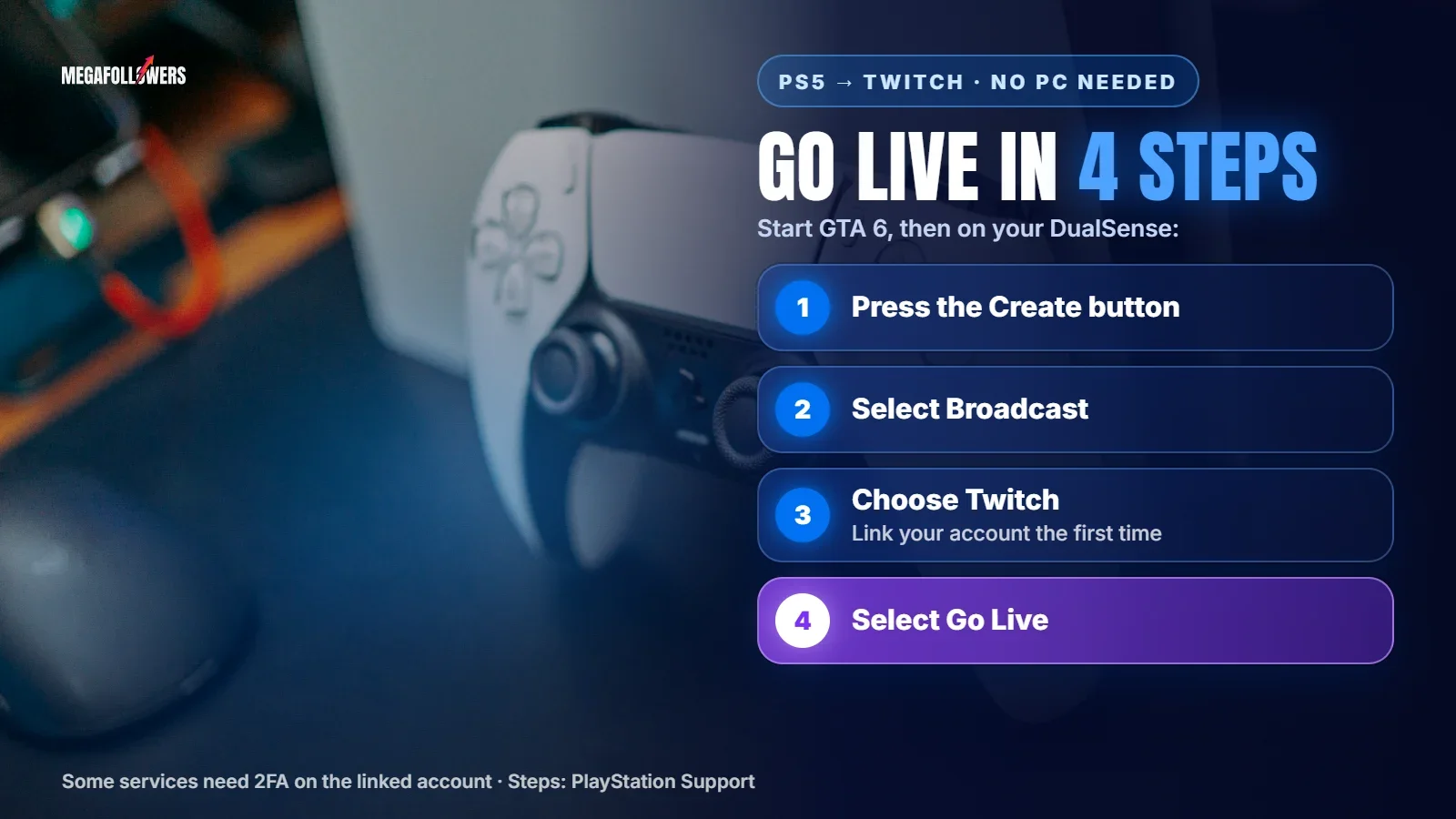
Not sure whether Twitch is already linked? Select Broadcast from the control centre, and the word Linked appears next to every service you've connected before.
Set the picture quality before your first session. Go to Settings > Captures and Broadcasts > Broadcasts and open Video Quality, where you pick a resolution and frame rate. Sony notes that available resolutions vary by service.
Some things stay off screen. Only the game screen and its audio reach your viewers, which keeps your menus, messages and other apps private. Depending on the game, Sony adds, some scenes may not appear to viewers at all.
If the stream refuses to start, look at 2FA first. PlayStation says you may need to switch it on in your linked account before Broadcast works. Then confirm Twitch still shows as Linked.
Want your face on stream? Connect a camera to the PS5, then open Broadcast Options before you go live and switch the camera on. Party audio works the same way, so your squad's voices can join the broadcast if they agree.
PS5 Broadcast is the best first stream for most players. You give up overlays, alerts and a custom layout, and in return you go live with the controller already in your hand and nothing new to buy or learn.
How to stream GTA 6 on Twitch from an Xbox Series X|S
Xbox Series X|S consoles stream to Twitch through the Twitch app and the Capture & share menu in the guide. Install the app once and activate it with a code. Every stream after that starts from the guide.
The first setup takes longer. Microsoft's UK support page sets it out like this:
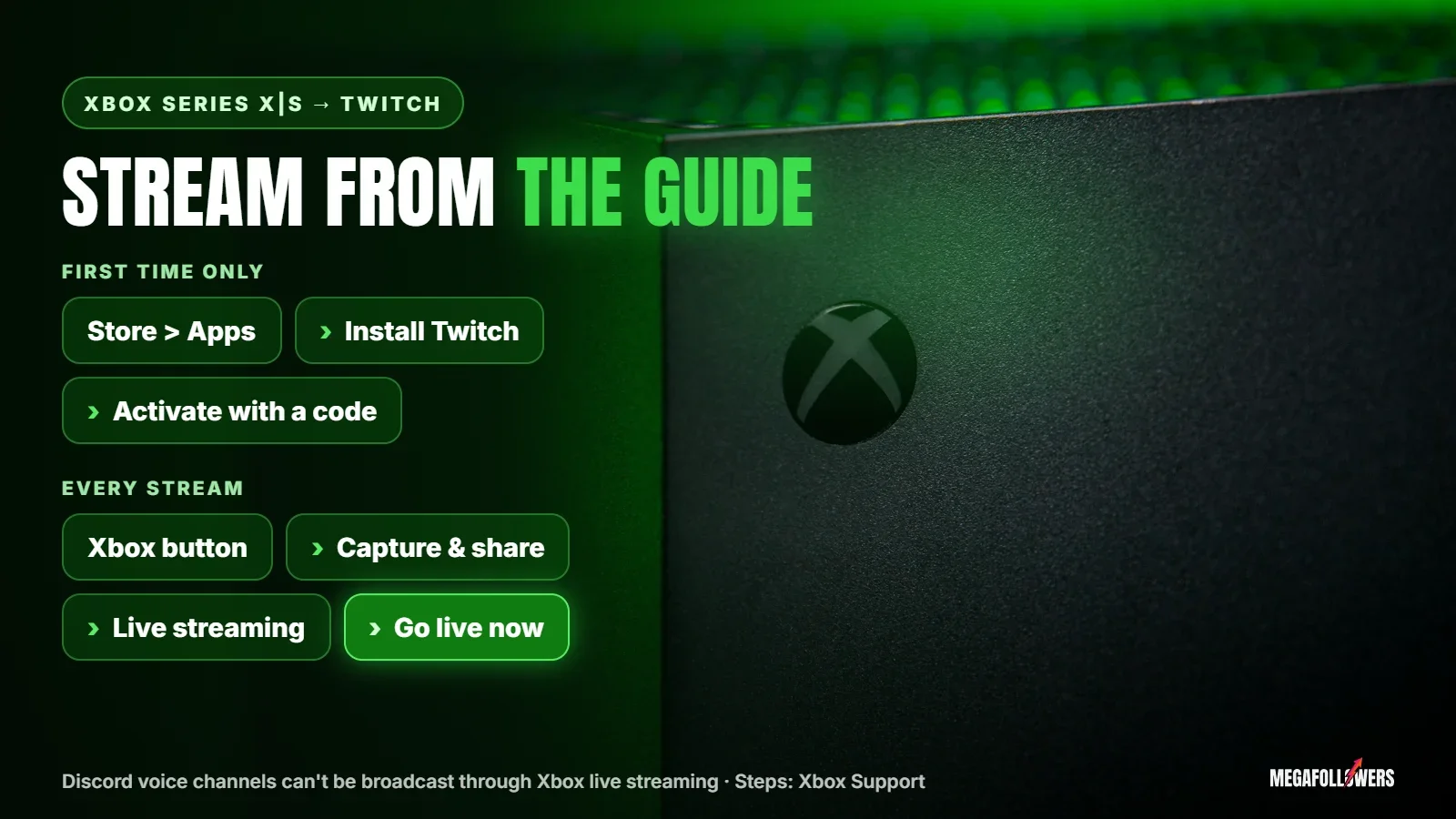
- Press the Xbox button to open the guide, then go to Store > Apps.
- Find the Twitch app and select Install.
- Open the guide again and go to Capture & share > Live streaming.
- Choose Twitch and activate your account with one of the methods on screen, such as a code.
After that, it gets quicker. Going live takes four presses from the guide, wherever you are on the console:
- Press the Xbox button and open Capture & share.
- Select Live streaming, then choose Twitch if you use several providers.
- Choose or change the Destination.
- Select Go live now.
Timing works a little differently from the PS5. When GTA 6 is already running, your stream begins as soon as focus returns to the game, but with no game open, it starts the moment you launch one. Either way, viewers never land on your dashboard.
One limit catches out squads. Microsoft says Xbox live streaming can't broadcast Discord voice channels, so friends talking on Discord won't reach your viewers. Use an Xbox party for any chat you want on stream, or move to the PC route, where OBS captures Discord audio along with everything else.
You can also set resolution and bitrate by hand in the live streaming options. Start in the middle of the range. Once you've watched a replay and seen how your connection copes with a busy Vice City street at night, raise it a notch.
This route suits anyone who already chats in Xbox parties. Once you've activated the app, it's just as quick as the PS5.
How to stream on Twitch from a PC with OBS
To stream on Twitch from a PC, connect your console to a capture card, add the card as a source in OBS and link OBS to your Twitch account. GTA 6 launched on PS5 and Xbox only. The PC captures and broadcasts, while the console still runs the game.
Wire it in this order. Run an HDMI cable from the console to the capture card's HDMI In port, then a second cable from the card's HDMI Out port to your TV. Plug the card into the PC with its USB cable, ideally into a USB 3 port.
PS5 owners have one extra step. Go to Settings > System > HDMI and switch off Enable HDCP, or the capture card may show nothing but a black screen.
OBS Studio is free and open-source, and Twitch's help pages describe the same setup step by step. Here's the order once it's installed:
- Open OBS and go to Settings > Stream.
- Select Twitch as the Service and click Connect Account.
- Log in to Twitch in the window that opens.
- Add a Video Capture Device source and pick your capture card.
- Watch the audio mixer: the game and your microphone should both move.
- Click Start Streaming.
Twitch recommends Connect Account over pasting a stream key. With it, you never handle the key, which matters because anyone who holds your key can broadcast to your channel.
Twitch's broadcasting guidelines list four recommended setups for output, and every one uses constant bitrate (CBR) with a 2-second keyframe interval. Pick the row your upload can hold steadily:
| Setting | Resolution | Bitrate | Frame rate | Keyframe interval |
|---|---|---|---|---|
| 1080p 60fps | 1920x1080 | 6,000 kbps | 60 or 50 fps | 2 seconds |
| 1080p 30fps | 1920x1080 | 4,500 kbps | 30 or 25 fps | 2 seconds |
| 720p 60fps | 1280x720 | 4,500 kbps | 60 or 50 fps | 2 seconds |
| 720p 30fps | 1280x720 | 3,000 kbps | 30 or 25 fps | 2 seconds |
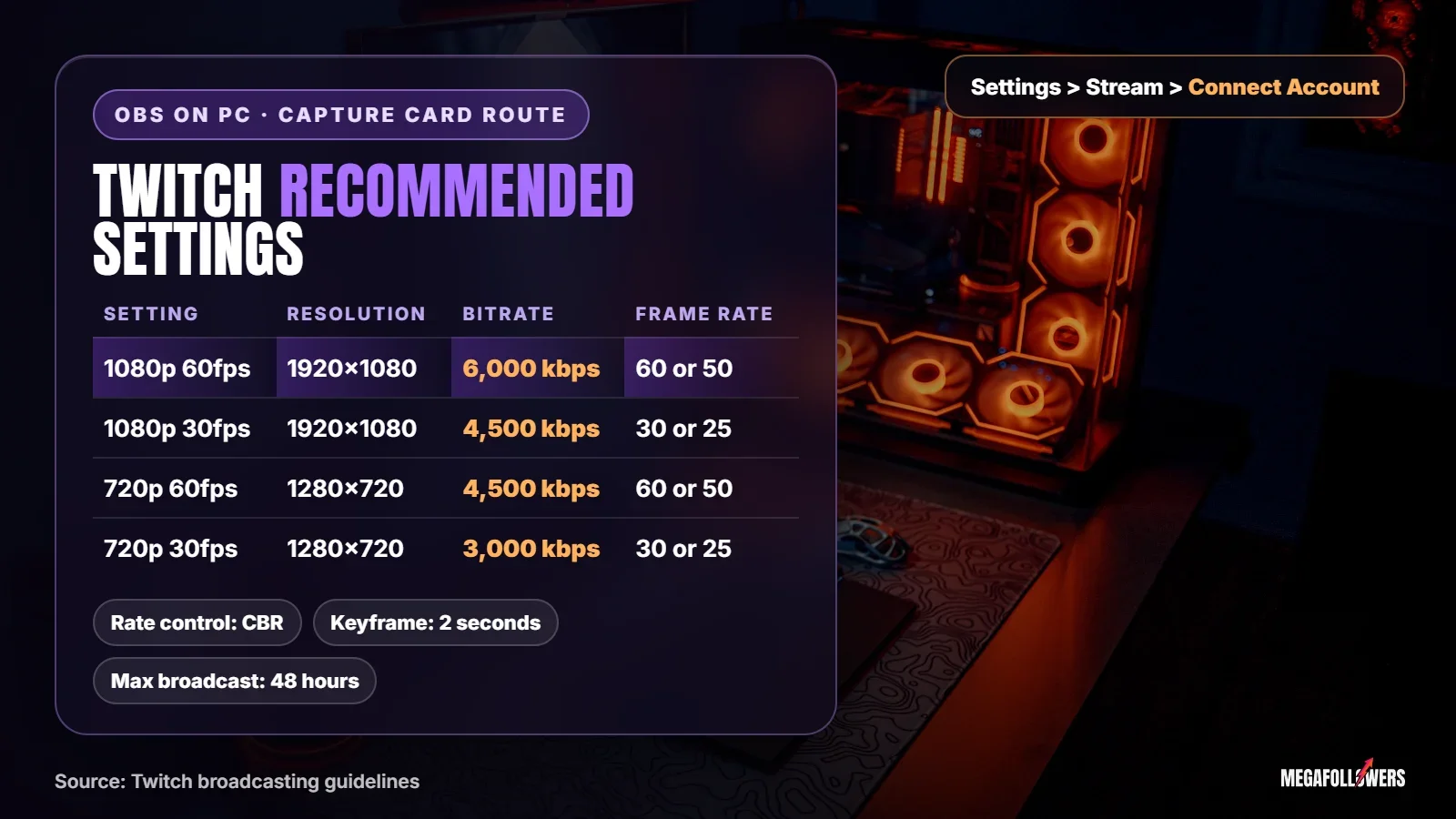
Read 6,000 kbps as Twitch's recommendation for full HD at 60fps. If your upload can't hold that steadily, drop to 720p at 60fps, because fast car chases in GTA 6 look better smooth at a lower resolution than juddering at a higher one. Smooth wins.
Plan around one hard limit if you fancy a launch marathon. Twitch caps a single broadcast at 48 hours, and nobody can extend it. Past that point, you start a fresh stream.
The PC route takes an evening to set up the first time. After that, OBS remembers your scenes, so every later stream starts with one click.
Twitch Studio is gone: what to use instead
Twitch Studio no longer works, so use OBS Studio on a PC or your console's built-in broadcast instead. Twitch's own notice says support for the app ended after 30 May 2024. It's gone.
Some guides still recommend it, including at least one updated in November 2026, and if you followed one and couldn't find a download, that's why. Twitch didn't replace it directly.
OBS does everything Twitch Studio did: scenes, alerts, a webcam and audio mixing. It's free, and its Connect Account button links to Twitch without a stream key. Console-only streamers need neither app.
Got an old Twitch Studio install on your PC? Uninstall it, so you don't open it by mistake on launch night and lose half an hour working out why it won't connect.
Set up your GTA 6 stream properly
Pick the GTA VI category, write a clear title and check that Twitch has applied its mature label. Those three steps help the right viewers find you, and they keep the stream inside Twitch's rules and Rockstar's.
The label usually takes care of itself. Twitch's content classification guidelines say the platform labels a stream automatically when the streamer plays a game with an ESRB rating of Mature, and Rockstar lists GTA 6 as ESRB M, so choosing the category should add it for you. Switch to a game without an M rating mid-stream, and Twitch removes it again.
Check it anyway. Twitch warns streamers who leave off a required label and applies the correct one itself. Repeat misses put the label on your whole channel for a set period, although Twitch says they won't lead to a suspension.
Write a title that tells people what they're joining. "GTA 6 first heist, no spoilers past mission 5" gets clicks that "chill stream" never will. Rockstar's launch post asked players to be mindful about sharing spoilers, and a spoiler warning in the title keeps chat friendly.
Rockstar has rules too. Its video policy lists these for anyone who posts or streams the game:
- Show cutscenes only as part of a longer play-through. Rockstar removes isolated videos of the game's cinematics.
- Never stream or share leaked pre-release footage of any kind.
- Avoid anything that promotes cheats, glitch exploits or mod menus.
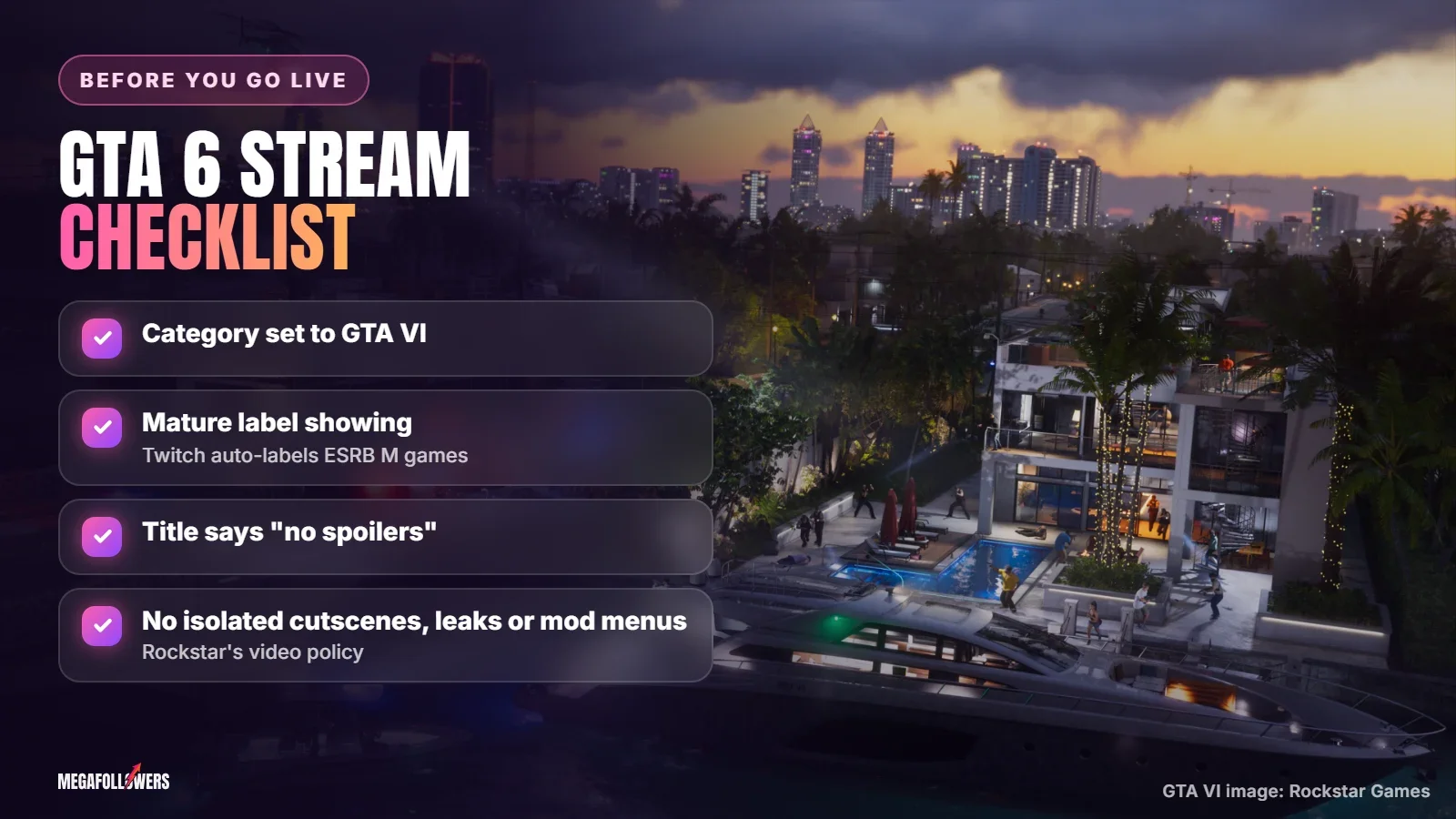
Straight play with commentary stays clear of all three. Add moderators you trust before your first big stream as well, because a busy GTA chat fills up with spoilers fast.
Can you make money streaming GTA 6 on Twitch?
You can earn on Twitch once you join the Affiliate programme, but GTA 6 footage brings a licensing question with it. Start with Twitch's targets, then weigh up the Rockstar side.
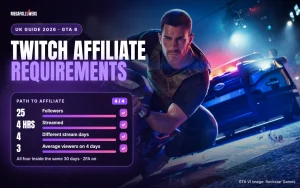
Affiliate comes first. Twitch's Affiliate page lists four targets and one account setting:
- 25 followers
- 4 hours of streaming
- Streams on 4 different days
- An average of 3 viewers on 4 different days, measured over any 4 stream days in the last 30 days
- Two-factor authentication switched on
Older guides quote 50 followers and 500 minutes, figures that are now out of date. Twitch also says days below 3 average viewers don't count against you, so a quiet Tuesday won't undo your progress. Nothing in these targets is specific to GTA 6, so the same numbers apply whatever you play.
Partner sits much higher. Twitch asks you to complete its Path to Partner achievement and, for the two months before you apply, to log at least 6 streams that meet a minimum of 75 average viewers in each 30-day period.
Then there's Rockstar. Its video policy says Take-Two generally doesn't object to fans using its material for non-commercial uses. It defines non-commercial as meaning "you don't make money through the game footage you post".
The policy doesn't mention Twitch subscriptions, Bits or ads by name. So nobody can promise you that a monetised GTA 6 stream is allowed, or that it's banned. Rockstar doesn't say it will act against earning streamers either.
Our view: treat Affiliate income from GTA 6 as a bonus until you see how Rockstar handles streams of this game in practice. If you plan a serious channel, email Rockstar's copyright team using the address on the policy page.
Grow your GTA 6 streams with short clips
Short clips grow a new GTA 6 channel faster than waiting for Twitch's directory to send viewers, because a 30-second chase on TikTok reaches people who never browse Twitch at all. Your stream is the main event, and the clips are the trailers.
After each stream, cut three or four moments of 15 to 40 seconds: a police chase that went wrong, a heist that went right, an NPC who wouldn't stop talking. Post them on TikTok and Instagram Reels across the week, and say in each caption when you're next live on Twitch.
Social proof gets those clips watched. A clip with a healthy count of TikTok likes looks worth stopping for, and Instagram Reel views do the same job for your Reels. You can try free TikTok likes on a single clip before you spend anything.
Point every clip viewer back to Twitch. Put your channel link in your TikTok and Instagram bios, and pin a comment with your streaming schedule.
Want to stream on TikTok as well? Our guide on how to go live on TikTok with GTA 6 covers the capture-card setups. Before you fix a clip schedule, check the best time to post on TikTok for UK audiences.
These services grow your TikTok and Instagram clips only. Twitch counts its own followers and viewers for Affiliate, and nothing bought counts toward those targets, so hit them through your streams.
What could change in 2027
The biggest UK change on the horizon is the government's plan to bar under-16s from social media, with livestreaming by under-16s named as a specific target. The government's announcement on 15 June 2026 says the protections could take effect in spring 2027.
That matters on Twitch, which accepts streamers from 13 today. If the plan goes ahead as announced, 13 to 15-year-olds in the UK would lose the ability to stream themselves. GTA streamers mostly won't feel it. PEGI rates the game at 18.
Check Twitch's terms again in spring 2027, once the government publishes the final rules. Plans can shift before then.
Frequently asked questions
Can you stream GTA 6 to Twitch straight from a PS5?
Yes. Press the Create button, select Broadcast, choose Twitch and select Go Live. On the first run, the PS5 asks you to link your Twitch account, and you may need two-factor authentication switched on. Only the game screen and audio reach viewers, so you can't add overlays or alerts this way.
Do you need a capture card to stream on Twitch?
Only for the PC route. A PS5 or an Xbox Series X|S can broadcast to Twitch on its own. A capture card lets a PC take the console's HDMI signal, so you can add overlays, alerts, a webcam and proper audio mixing in OBS before the stream goes out.
How old do you have to be to stream on Twitch in the UK?
Twitch's minimum age is 13. Anyone under 18 can only use Twitch while a parent or guardian supervises them and agrees to the terms. PEGI rates GTA 6 at 18, though, so younger streamers fall below the game's own age rating even when Twitch allows them.
Is Twitch Studio still available?
No. Twitch ended support for Twitch Studio after 30 May 2024, and the app no longer works. Use OBS Studio on a PC instead, which is free and links to Twitch through Settings > Stream > Connect Account, or use the built-in broadcast feature on a PS5 or Xbox Series X|S.
What are the Twitch Affiliate requirements in 2026?
You need 25 followers, 4 hours of streaming, streams on 4 different days and an average of 3 viewers across any 4 stream days in the last 30 days. Two-factor authentication must be on as well. The older targets of 50 followers and 500 minutes no longer apply.
Will my GTA 6 stream be labelled mature?
It should be, automatically. Twitch labels streams of games that carry an ESRB Mature rating, and Rockstar lists GTA 6 as ESRB M. Check the label before you go live anyway, because Twitch warns streamers who miss a required label and then applies the correct one itself.