How to Check Direct Messages on Instagram in the UK: App and Desktop Guide for 2026 and 2027
How to check direct messages on Instagram in 2026: where Messages is now, finding requests and spam, reading without seen, and DM tools in the UK.
In this article
Quick answer: Here's how to check direct messages on Instagram: in the app, tap Messages at the bottom of the screen and open any chat. On a computer, go to instagram.com and click Messages on the left. Messages from people you don't follow wait in Requests, and suspected spam sits in a Spam folder inside Requests.
Someone says they've messaged you, and you can't see a thing. Instagram has moved Messages more than once, and requests from strangers don't land where you'd expect.
This guide shows how to check direct messages on Instagram on your phone and computer in 2026. It also covers where requests and spam hide, how to read without a "seen" receipt, and which chat tools work in the UK. Quick fixes first.
How to check direct messages on Instagram in the app
Messages now sits in the bar at the bottom of the app. Older guides point to a paper-plane icon in the top right, but every current Instagram help page starts with the same instruction: tap Messages at the bottom.
- Open the Instagram app.
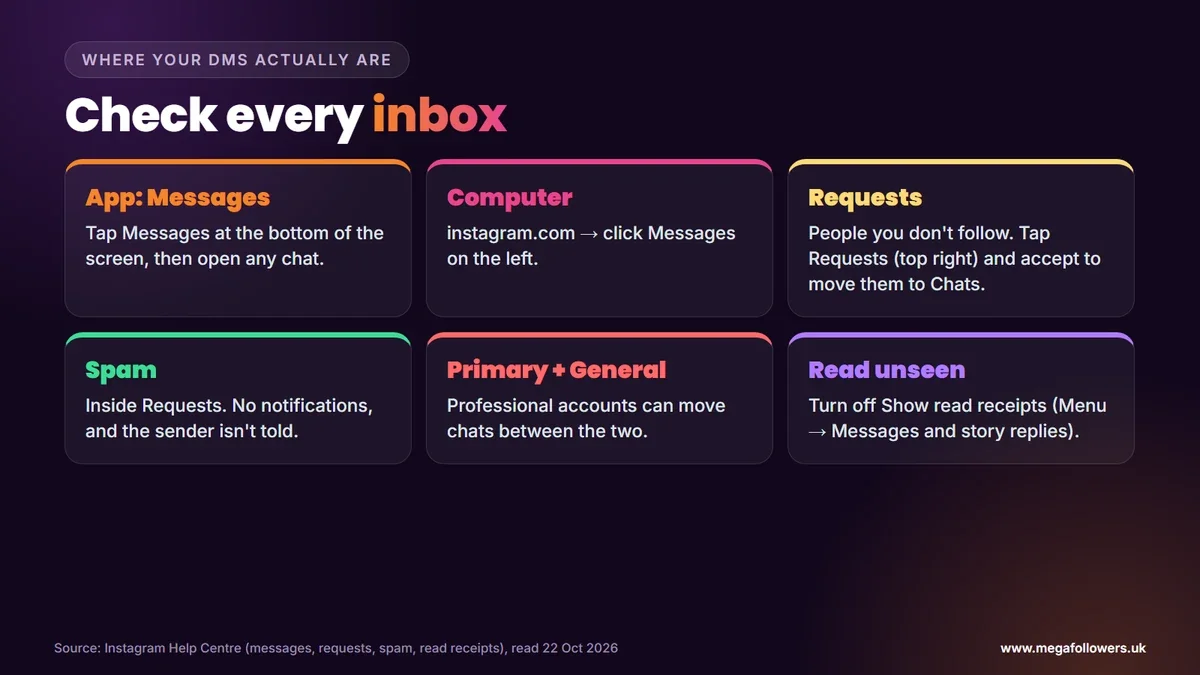
- Tap Messages at the bottom of the screen.
- Scroll your Chats list and tap any conversation to open it.
- Tap the search bar at the top to find a chat by name.
New chats sit at the top of the list. If someone you don't follow messaged you, their chat won't appear here at all, which is where most "I never got it" confusion starts.
How to check Instagram DMs on a computer
On a laptop or desktop, Messages sits on the left of instagram.com. Instagram's help page Send a message to someone on Instagram gives the steps for the web version:
- Go to instagram.com in your browser and log in.
- Click Messages on the left.
- Click a chat to read it, or click Compose in the top left to start a new one.
It's the same inbox as the app, just on a bigger screen. That's handy for long replies, because typing on a full keyboard beats thumbing out paragraphs, and it makes a business inbox far easier to work through at a desk.
Where to find message requests and hidden spam
Messages from people you don't follow skip your main Chats list. They go to Requests. Instagram's page on managing message requests says you must accept a request in the Message Requests folder before it appears in your Chats. Until then, the sender can only send text.
To open them in the app, tap Messages, then tap Requests in the top right. Inside, there's a second layer. The spam help page explains that suspected spam goes to a Spam folder inside Requests, you get no notifications for it, and the sender isn't told.
| Folder | What lands there | Do you get notified? |
|---|---|---|
| Chats | People you follow and requests you've accepted | Yes |
| Requests | People you don't follow | Yes, as a request |
| Spam (inside Requests) | Messages Instagram suspects are spam | No |
| Primary and General | Professional accounts can sort chats between these two | Depends on the folder |
Check Spam often. Real messages from brands, buyers and old friends can end up there too.
You can also tighten what reaches you. Instagram's setting called Hide unwanted message requests is off by default for adults, while Teen Accounts have it switched on automatically.
Primary and General folders on business and creator accounts
Professional accounts get two inbox tabs instead of one. In its help page on inboxes connected to third-party tools, Instagram explains that new chats from people you follow appear in Primary, and that you can move individual messages between General and Primary.
Use Primary for chats that need a reply this week. General takes the rest. If you run a shop, that split stops a customer question getting buried under creator-collab spam.
How to read Instagram DMs without "seen"
Turning off read receipts is the official way, and it takes well under a minute to set up. Instagram's help page on read receipts offers two switches:
- For every chat: Menu, Messages and story replies, Show read receipts off.
- For one chat: open the chat, tap the name at the top, then Privacy & safety, then Read receipts.
The per-chat setting overrides the global one. Simple.
Two more official routes exist. Restricting someone moves their chat to Message Requests, where you can read it without them knowing. Instagram Plus, the paid subscription Instagram launched on 4 June 2026, also lists a Preview messages feature that lets subscribers look at a chat without marking it as read.
Skip any app or website that claims it can open DMs for you, because Instagram's help page on third-party apps warns never to share your login with an app you don't trust. Your account isn't worth the gamble.
DM tools worth knowing in 2026
Instagram has added several chat features, and most work in the UK. Each one below comes from Instagram's own help pages:
- Edit a message: you have up to 15 minutes to edit it, up to 5 times, and it shows an Edited label.
- Unsend: tap and hold, then Unsend. The message disappears from the chat, though people may already have seen it.
- Schedule: tap and hold next to a text message to pick a send date and time. Only you see it until it sends.
- Translate: tap and hold, then Translate. The text is shared with Meta to make the translation.
- Pin chats: pin up to 3 chats to the top of your inbox, on personal accounts only.
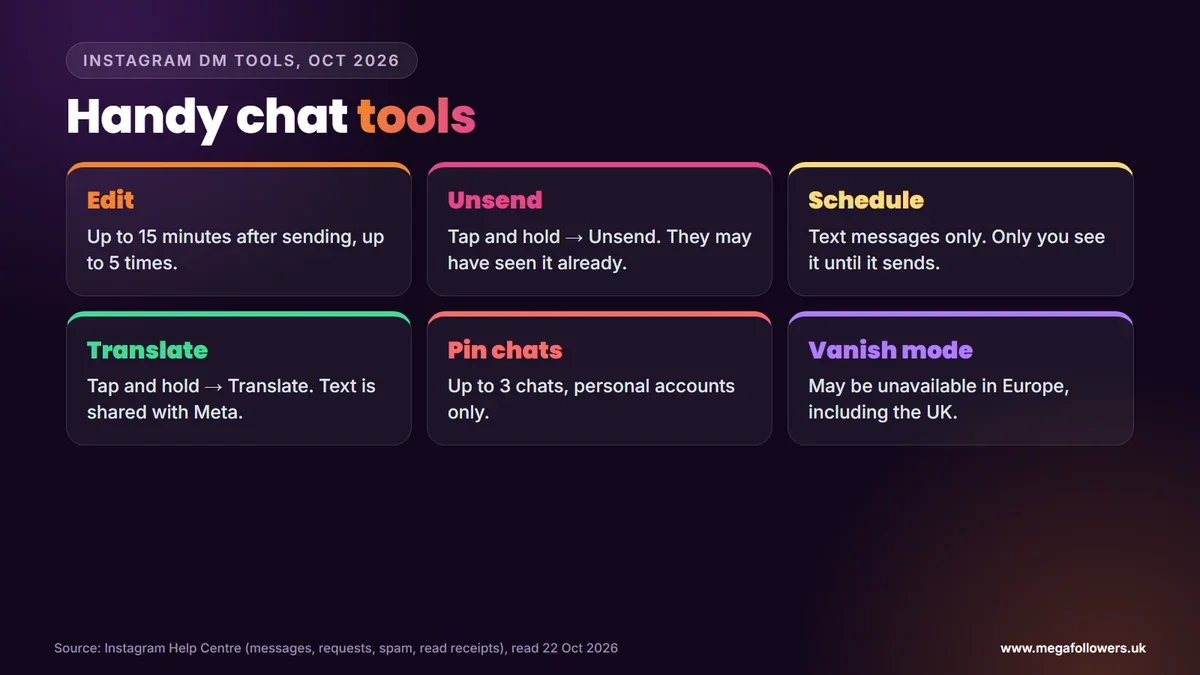
One feature UK users may miss out on. Instagram's vanish mode page says the feature may be unavailable in Japan and in countries located in Europe, so swiping up in a chat may do nothing here. Annoying, but expected.
Instagram messages in 2027: what may change in the UK
The biggest UK change is about who's on the app at all. The government said on 15 July 2026 that it expects its ban on social media services for under-16s to start in spring 2027, with age checks behind it.
Our view: if you run a business inbox, expect fewer DMs from younger followers once it starts, and expect more chats from adults who've passed age checks. Meta is also moving settings from Accounts Center to Meta Account, so a few menu names in this guide may change during 2027.
Turn your DMs into a business channel
A busy inbox usually follows a busy profile. People are far more likely to message an account that already looks active, with likes on its posts and comments underneath them, than one that looks brand new.
Mega Followers UK helps with that first impression. Our Instagram comments, Instagram likes and Instagram followers come from real-looking accounts, with no password required and a 30-day refill guarantee. For turning those chats into customers, read our guide to social media lead generation, see does Instagram notify when you screenshot, or check our FAQs.
FAQ: checking Instagram DMs
Where are messages on Instagram now?
In the app, Messages sits in the bar at the bottom of the screen, which replaced the old paper-plane icon in the top right. On a computer, Messages is on the left of instagram.com. Chats from people you don't follow wait in Requests until you accept them.
Why can't I see a message someone sent me on Instagram?
It's probably in Requests. Messages from people you don't follow go there first, and suspected spam goes to a Spam folder inside Requests without any notification. Tap Messages, then Requests in the top right, then check Spam. If the sender blocked you, nothing they sent will arrive.
How do I see message requests on Instagram?
Tap Messages at the bottom of the app, then tap Requests in the top right. You'll see chats from people you don't follow, and you can accept, delete or block each one. Accepted requests move into your main Chats list, and the sender can then share photos and links as well as text.
Can I check Instagram DMs on a computer?
Yes. Go to instagram.com, log in and click Messages on the left. You can read, reply and start new chats with Compose in the top left. It's the same inbox you see in the app, so nothing needs setting up first, and a full keyboard makes long replies much quicker.
How do I read Instagram messages without them knowing?
Turn off read receipts: tap Menu, then Messages and story replies, then switch off Show read receipts, or change it for one chat under Privacy & safety. Restricting someone also lets you read their messages unseen. Instagram Plus subscribers get a Preview messages option that doesn't mark chats as read.
Does vanish mode work in the UK?
Possibly not. Instagram's help page says vanish mode may be unavailable in countries located in Europe, and the UK falls under that wording. If it does work for you, Instagram notifies you when someone screenshots a vanish mode chat, so treat those messages as private but not untraceable.