How to Get More Followers on Instagram: 14 UK Steps for 2026 and 2027
How to get more followers on Instagram in 2026: 14 steps from Instagram's own advice, the 5-hashtag limit, originality rules, trial reels and 2027 changes.
In this article
Quick answer: Here's how to get more followers on Instagram: switch to a professional account, post original reels with a hook in the first three seconds, make content people send to friends, test ideas with trial reels and post regularly. Use up to 5 relevant hashtags, put keywords in your name and bio, and track watch time and sends.
You post, people like it, and the follower count still crawls. It's the most common Instagram complaint, and the advice online is a mess of hacks that stopped working years ago.
This guide shows how to get more followers on Instagram using what Instagram itself has published, including the originality rules from April 2026, the 5-hashtag limit and trial reels. You'll get 14 steps, the habits that hold accounts back, and what's changing in 2027.
How Instagram decides who sees your posts
Your posts reach new people mainly through recommendations, and Instagram has explained how that works. Its creators blog from February 2025 says a reel first goes to a small audience of non-followers, then wider if it performs, based on its engagement rather than the creator's follower count.
That's good news for small accounts. A great reel from an account with 300 followers can reach people a big account never would. The signals Instagram names are watch time, retention, shares, likes and comments, plus how well the reel matches each viewer.
Adam Mosseri, who runs Instagram, put it more simply in January 2025. The top three signals for ranking are watch time, likes and sends, and he suggested tracking average watch time, likes per reach and sends per reach.
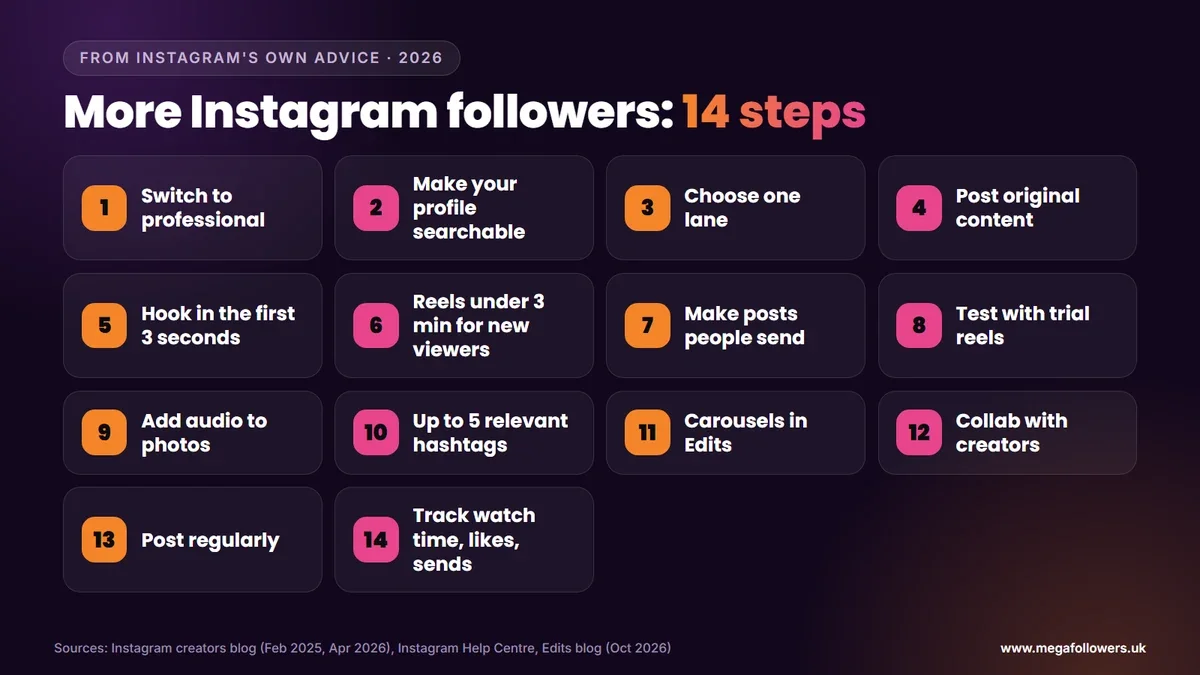
How to get more followers on Instagram: 14 steps
1. Switch to a professional account
Growth tools live behind a professional account. Go to your profile, tap More, then Account type and tools under For professionals, and choose Switch to professional account, picking Creator or Business.
You get the professional dashboard, with insights and monetisation eligibility. Trial reels open earlier too: professional accounts need 200 followers, against 1,000 for personal ones. Heads up. Switching a private personal account makes it public and accepts pending follow requests.
2. Make your profile searchable
Search runs on topics as much as names. According to Instagram's guide to how search works, keywords belong in your username, name and bio, and in your captions.
So a bakery in Leeds should have "Leeds bakery" or "cakes Leeds" in the name field as well as the brand. Your bio then tells visitors what they'll get by following, such as "Weekly bakes and recipes", which makes the follow decision almost automatic for anyone who likes cake.
3. Choose a lane people can follow
Followers sign up for what comes next. Pick one or two related topics you can post about for months, and let every post fit that lane.
Clarity helps the algorithm too. Since recommendations match reels to viewers, a consistent topic paints a sharper picture of who'll enjoy your next post.
4. Post original content
Originality now decides whether Instagram recommends you at all. Its creators blog from 30 April 2026 extended originality protections from reels to photos and carousels, and said accounts that mainly repost other people's work aren't eligible for recommendations.
Borders, watermarks, subtitles and caption credits don't make a repost original. Share someone else's work through collabs, remix, reposts or stories instead. Slipped already? Your account regains eligibility once most of its posts over a rolling 30 days are original, and Account Status shows where you stand.
5. Hook viewers in the first three seconds
A compelling hook in the first three seconds is what the creators blog asks for. Lead with the result. A surprising line or a question works too, and the setup can wait until you've earned a few seconds of attention.
Then check your view rate in insights: the share of viewers who watched past three seconds. Low view rate? Fix the hook before anything else.
6. Keep reels under three minutes for new audiences
Reels can run to 20 minutes, yet anything over 3 minutes won't reach new audiences through recommendations, according to Instagram's help page. For growth, keep reels meant for non-followers under that mark.
Longer reels still have a place with your existing followers. Tutorials, behind-the-scenes clips and deep dives all work for people who already know and like you.
7. Make posts people want to send
Sends matter most for reaching non-followers. Mosseri said likes weigh slightly more for followers, while sends weigh slightly more for people who don't follow you yet.
Ask yourself who a viewer would send the post to. Relatable jokes, useful checklists, local tips and "this is so you" moments travel, and every send puts your account in front of someone new.
8. Test ideas with trial reels
Trial reels let you test a reel on non-followers first. The trial reels help page explains the steps: record a reel, tap Trial, then Next and Share, with insights arriving within 24 hours.
Did it land? Go to the reel's insights and choose Share to everyone, or set trials to share automatically. Instagram says trial reels don't affect how your standard reels perform, so new formats cost you nothing to try.
9. Add audio to photos and carousels
Audio isn't just for reels. Instagram's creators blog suggests adding it to photos and carousels as well, giving a still post a reason to hold attention a little longer.
Match the mood rather than the chart. Calm music suits a recipe carousel; a loud meme sound under a wedding photo probably doesn't.
10. Use up to five relevant hashtags
Five is now the maximum. The hashtag help page warns that a comment with more than five tags won't post, and Instagram's @creators account announced the limit on 18 December 2025.
Choose tags that describe the post precisely, such as #leedsbakery over #food. Skip #reels and #explore. That same creators account says generic tags like those don't help, so they only waste one of your five precious slots.
11. Build carousels in Edits
Carousels pack a full guide into one post, and people save and send them. Instagram's free Edits app added a carousel editor on 7 October 2026, first on iPhone with Android to follow, and it posts straight to Instagram.
Open Edits, go to the Projects tab, tap the plus button and choose Carousel. Then turn your most useful tips into slides worth keeping.
12. Collaborate with other creators
Collabs put your post on another account's grid and in front of its followers at the same moment. Collabs, remix and reposts are the ways Instagram itself names for building on each other's work.
Look for partners in a related niche with a similar audience size. Think a Leeds bakery and a Leeds coffee shop. Their followers already overlap.
13. Post regularly
Regular posting is the official advice, with no magic number attached. Each post is another chance to reach new people through recommendations, and each one teaches you a little more about what your audience will actually stop scrolling for.
Choose a rhythm you can keep for three months. Three good reels a week will beat a burst of daily posts that fizzles out by the end of the month, because consistency is what lets recommendations learn who your audience is.
14. Track the numbers that matter
Insights tell you which posts win followers. Watch average watch time, likes per reach and sends per reach, the three numbers Mosseri named, and compare them across posts.
When a post brings in followers, make more like it. That's the loop. Test, measure, repeat.
What holds Instagram accounts back
A few habits quietly stop growth, and Instagram's own rules explain why. Its Recommendations Guidelines say Instagram doesn't recommend low-quality content such as reposts with only minor edits, long captions unrelated to the post, or content from coordinated comment networks set up to fake engagement.
| Habit | What happens |
|---|---|
| Reposting other people's work | Accounts that mainly repost aren't eligible for recommendations |
| More than five hashtags | Your caption or comment won't post |
| Reels over three minutes | Not recommended to new audiences |
| Long, unrelated captions | Listed as low-quality content |
| A private account | Your tagged posts don't appear on public hashtag pages |
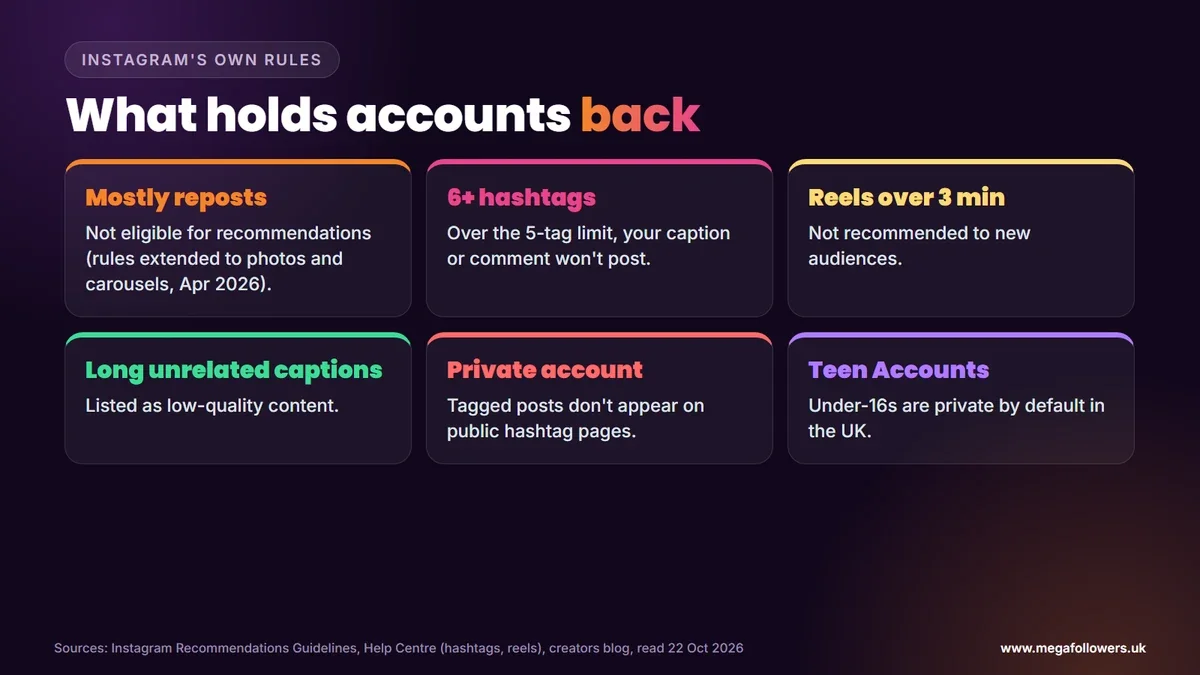
Age affects reach too. Instagram's Teen Accounts, rolled out in the UK from September 2024, make under-16s private by default and limit who can contact them, so a teen's account grows more slowly by design.
Growing on Instagram in 2027
Two UK changes will shape growth next year. The government said on 15 July 2026 that it expects its ban on social media services for under-16s to start in spring 2027, so accounts with young audiences should plan for some of them to leave.
Meta also told investors in July 2026 that it expects recommendation gains to continue over the rest of the year and into 2027. Our view: originality and sends will matter even more in 2027, so start building those habits now.
Give your profile the social proof it needs
Every step above brings new visitors to your profile. What they see there decides whether they follow, and a profile with a healthy follower count and well-liked posts looks like one worth joining.
Mega Followers UK helps with that first impression. Our Instagram followers, UK Instagram followers, Instagram likes and Instagram reel views come from real-looking accounts, with no password required and a 30-day refill guarantee. For more organic growth, read how the Instagram algorithm works, how to get more Instagram likes and the best time to post on Instagram, or check our FAQs.
FAQ: getting more Instagram followers
What's the fastest way to reach 1,000 Instagram followers?
Switch to a professional account, choose a clear lane and post original reels with a strong hook. At 200 followers, professional accounts can use trial reels to test ideas on non-followers. Use up to five precise hashtags, put keywords in your name and bio, and make posts people want to send.
How many hashtags should I use on Instagram in 2026?
Up to five, because that's Instagram's limit. Its help page says a caption or comment with more than five tags won't post, and the @creators account announced the change on 18 December 2025. Pick specific tags that describe the post, since generic ones like #reels and #explore don't help.
Does posting more often get more Instagram followers?
Posting regularly helps, because each post is another chance to reach new people through recommendations. Instagram doesn't publish an ideal number. Choose a pace you can keep for months, and focus on original posts with strong hooks, since accounts that mainly repost others' work aren't eligible for recommendations.
Why is my Instagram follower count stuck?
Usually it's one of four things. A private account, reposted content, a mix of unrelated topics and weak hooks all slow growth, and any one of them can stall an account that's otherwise doing well. Start with Account Status. Then keep reels for new viewers under three minutes, watch your view rate and add keywords to your name and bio.
Are trial reels worth using?
Yes, especially for testing new formats. Trial reels go to non-followers first, and Instagram says they don't affect how your standard reels perform. Professional accounts need 200 followers and personal accounts 1,000. Insights arrive within 24 hours, and you can share a winning trial with everyone.
Should I switch to a business or creator account?
Either works for growth, since both are professional accounts with the dashboard, insights and trial reels from 200 followers. The category you pick doesn't decide which type you get. Choose Creator for personal brands and Business for shops and services, and remember that switching makes a private account public.